What Is a Good Reply Rate for Cold Emails?
A solid cold email reply rate in 2026 is 5–10%; beating averages requires clean deliverability, precise targeting, personalized copy, and a 4–7 touch follow-up sequence.

A good reply rate for cold emails in 2026 is between 5% and 10%, with top performers exceeding 12%. The average reply rate is 3.43%, but only 14.1% of those replies express genuine interest, resulting in an effective "interested reply rate" of just 0.64%. Here's what you need to know:
- Industry Benchmarks: Reply rates vary by industry. Recruiting averages 7.2%, while SaaS companies often see rates as low as 2.4%–5.2%. Small businesses and C-level executives tend to respond more positively than larger companies or lower-level contacts.
- Key Factors Affecting Reply Rates:
- Deliverability: About 16% of emails never reach inboxes. Proper technical setup (e.g., SPF, DKIM, DMARC) can improve results.
- Personalization: Basic personalization yields 5%–9% reply rates, while advanced, signal-based personalization can push rates to 15%–25%.
- Follow-Ups: 60% of positive replies come after the first email, with follow-up sequences of 4–7 touchpoints being most effective.
- Improving Results: Short, personalized emails (50–125 words) with a single, clear CTA perform best. Timing matters - send emails on Tuesday to Thursday between 9:00 AM and 11:00 AM (recipient's local time).
How to Get Better Cold Email Reply Rates (Proven Data Tips)
Cold Email Reply Rate Benchmarks
Cold Email Reply Rate Benchmarks by Industry and Company Size 2026
Reply Rate Ranges by Industry
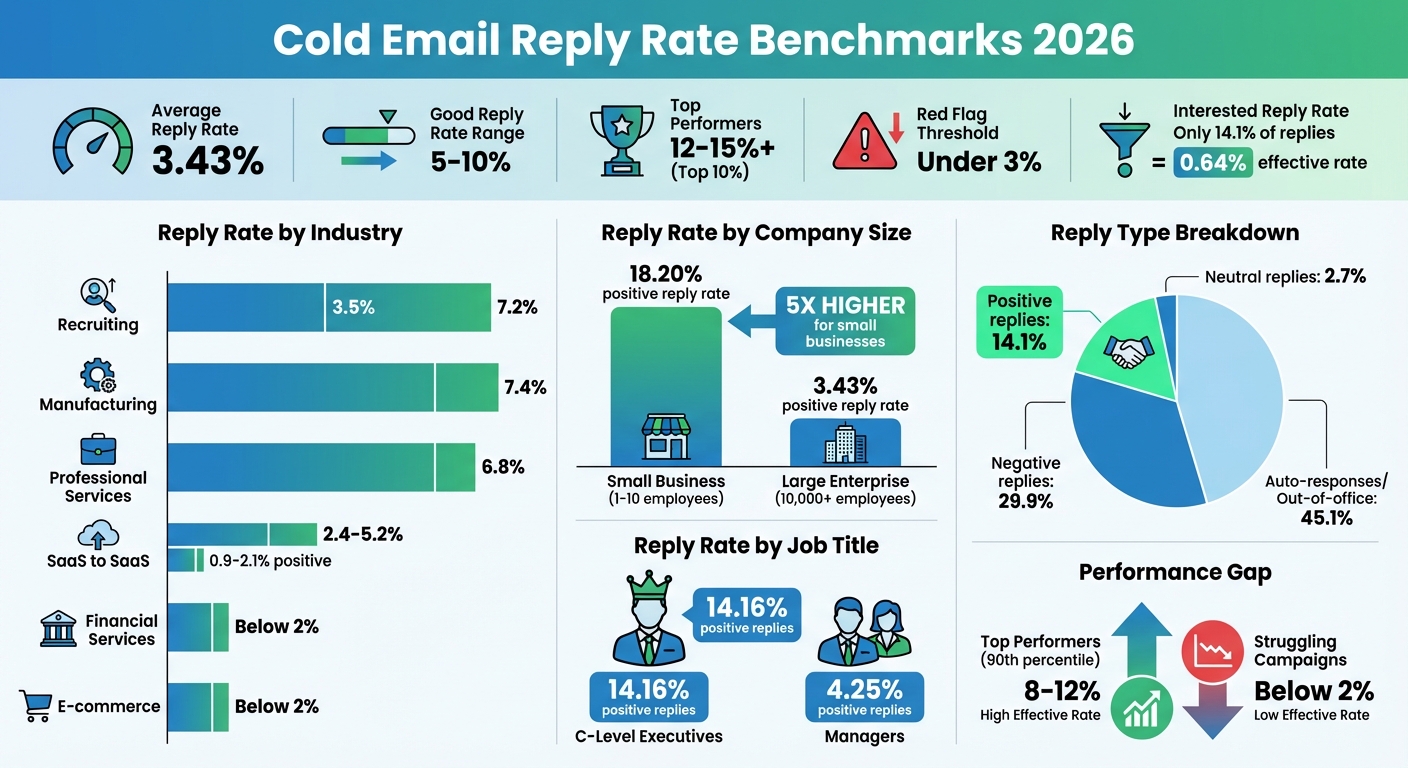
What counts as a solid reply rate? It largely depends on your industry and who you're targeting. For most B2B teams, reply rates between 5% and 10% are considered solid, while top performers push that number to 12% to 15% or higher. On the flip side, reply rates under 3% are a red flag that your strategy needs some serious adjustments.
The numbers vary quite a bit by industry. For example, recruiting teams average a 7.2% reply rate, with 3.5% positive replies. Manufacturing and professional services also perform well, with reply rates of 7.4% and 6.8%, respectively. On the lower end, SaaS companies selling to other SaaS businesses see reply rates between 2.4% and 5.2%, with positive replies falling in the 0.9% to 2.1% range. Financial services and e-commerce often face even tougher challenges, frequently landing below 2% reply rates.
Company size plays a big role too. Contacts at small businesses (1–10 employees) achieve an impressive 18.20% positive reply rate - over five times higher than large enterprises (10,000+ employees), which average just 3.43%. Similarly, C-level executives respond positively 14.16% of the time, compared to managers, who hover at 4.25%.
The performance gap between average and top-tier campaigns is striking. Top performers in the 90th percentile hit reply rates of 8% to 12%, while struggling campaigns often fail to reach 2%. This gap highlights the importance of precise targeting and crafting relevant, engaging messaging to improve reply quality.
Next, let’s explore how reply types differ and why quality matters more than quantity.
Positive Replies vs. Neutral Replies
Not all replies are created equal. While reply rates give you a broad idea of performance, understanding the quality of those replies is where the real insights lie.
Here’s how reply types break down:
- 45.1% are auto-responses or out-of-office messages.
- 29.9% are negative replies, like "not interested" or "stop emailing me."
- 14.1% are positive replies, such as meeting requests or pricing inquiries.
- 2.7% are neutral acknowledgments, like "maybe later".
These numbers show why focusing solely on raw reply rates can be misleading. The quality of replies - especially positive ones that move the conversation forward - is far more important than just chasing higher response volumes. Positive replies often include requests for demos, pricing details, or referrals to decision-makers, making them the most valuable metric for assessing your outreach success.
Neutral replies, while not immediately actionable, can still signal potential leads that might convert with proper follow-up and nurturing. By prioritizing genuine engagement over sheer numbers, you’ll set your campaigns up for long-term success.
What Affects Cold Email Reply Rates
Reply rates are often seen as a measure of success, but the factors influencing them go beyond just the content of your email. In many cases, low reply rates stem from technical issues rather than poor copy. For example, bad data can result in high bounce rates, which harm your domain's reputation and send your emails straight to spam. Before diving into copy revisions, it’s crucial to focus on three key areas that impact whether your emails get responses.
Email Deliverability and Technical Setup
Did you know that 1 in 6 cold emails never even makes it to the inbox? Globally, the average inbox placement rate is about 84%, and for Microsoft emails, it’s even lower - just 75.6%. This means nearly a quarter of your emails to Outlook users might disappear before anyone sees them.
The technical setup behind your emails is critical. SPF, DKIM, and DMARC records are essential for bypassing spam filters and meeting updated standards for Gmail and Yahoo in 2024/2025. Skipping these records can cut your deliverability by as much as 30%. Before tweaking your email copy, make sure to audit your DNS records and check if your domain is blacklisted.
Another surprising factor? Disabling open-tracking pixels. In a study of 44 million emails, reply rates more than doubled - from 1.08% to 2.36% - when tracking pixels were turned off. These pixels are often flagged as spam triggers, so removing them can improve deliverability.
To keep your emails out of spam folders, limit your sending volume to 50-100 emails per day per domain. For new domains, start small - send just 10-20 emails per day and gradually increase over 2-4 weeks to build trust with email providers. Keep your bounce rate under 2% to avoid signaling poor list quality, and ensure spam complaints remain below 0.3% to protect your sender reputation.
Once your emails are landing in inboxes, the next step is making sure they reach the right people with a message that resonates.
List Quality and Personalization
Beyond deliverability, the quality of your email list and the level of personalization are major drivers of response rates. Basic personalization - like using {{First_Name}} and {{Company}} - can yield reply rates between 5-9%, which is considered the baseline as of 2026. However, signal-based personalization, which ties your outreach to specific triggers like recent funding, leadership changes, or hiring trends, can boost reply rates to 15-25%. Compare that to the 1-3% reply rates for generic, non-personalized templates.
The numbers don’t lie: personalized campaigns generate nearly twice the replies of generic ones. Taking it a step further, research-based personalization - where you incorporate detailed, contextual insights - results in a 52% higher reply rate than basic personalization. Despite these benefits, only about 5% of senders take the time to personalize every email, yet they achieve 2-3x more replies.
For top-tier results, focus on micro-segmentation. Campaigns targeting small, highly specific groups of 50 recipients or fewer achieve a 2.76x increase in reply rates compared to broad campaigns targeting thousands. Segmenting your list by factors like tech stack, hiring patterns, or growth stage ensures your emails are highly relevant. After all, 71% of ignored cold emails lack relevance, and 43% fail because of poor personalization.
Maintaining a clean email list is non-negotiable. Verify every address to keep bounce rates below 2%, as high bounces harm your sender reputation and reduce response rates. Outdated or irrelevant contacts, or emails sent to the wrong departments, can significantly lower your chances of getting a reply.
Follow-Up Sequences and Send Times
Even with great technical setup and a well-targeted list, timing and follow-ups play a huge role in boosting reply rates. Interestingly, 60% of positive replies come after the initial email. If you stop after one or two messages, you’re leaving 40-60% of potential responses on the table.
The first follow-up, often sent on Day 3, is especially impactful - generating 38% of all positive replies in a sequence. A well-timed follow-up can increase reply rates by up to 50%. The ideal sequence length is 4-7 touchpoints. Shorter sequences miss opportunities, while longer ones - exceeding eight touches - can lead to more spam complaints and diminishing returns.
Timing matters just as much as frequency. Gradual intervals like Day 1, Day 3, Day 7, Day 14, and Day 28 help you avoid spam filters. Sending daily follow-ups not only lowers reply rates but also generates 9x more spam complaints.
When it comes to the best days and times, aim for Tuesday through Thursday, between 9:00 AM and 11:00 AM, in the recipient’s local time. This window consistently delivers the highest engagement rates. Thursday stands out as the top-performing day, with an average reply rate of 6.87%. Lastly, keep your emails concise - 50 to 125 words is the sweet spot. Shorter emails respect your prospect’s time and force you to clarify your value proposition.
How to Increase Your Reply Rates
If you're looking to get more responses, these targeted strategies can make a big difference.
Write Short, Personalized Emails
The best cold emails are short - 50 to 125 words is the sweet spot, making them easy to read in about 15 seconds. To keep things clear, break your email into 1–3 short, single-sentence paragraphs.
Stick to one clear call-to-action (CTA) per email. Too many CTAs can confuse readers, and emails with a single CTA get 371% more clicks compared to those with multiple asks. Instead of pushing for a meeting right away, try low-pressure questions like, "Does this make sense?" or "Worth a quick chat?"
Go beyond just using someone's first name. Reference something specific, like a recent funding round, a new product launch, or even a LinkedIn post they shared. And keep your writing simple - emails written at a 5th-grade reading level generate 50% more replies than overly complex ones.
Once your email feels right, start experimenting with its components to see what resonates best.
Test Different Email Elements
Testing is key to improving your emails. Focus on the most impactful parts first: your targeting and offer. Then, refine subject lines, email copy, and CTAs.
For subject lines, aim for 3 to 8 words (or under 40 characters) to ensure they display well on mobile. Including both first and last names in the subject can boost open rates to around 33%.
When it comes to CTAs, try different styles. For example, asking "Want to see it in action?" (a video or demo-based CTA) can lead to positive reply rates as high as 30% - that’s 3.5 times better than generic requests like "Send more info". An informal tone also helps, with reply rates roughly 10% higher, outperforming formal tones by 78%.
Track the sentiment of replies - whether they’re positive, neutral, or negative - to figure out what’s working. And remember, test one thing at a time. For example, compare a question-based subject line to a statement-based one or try different CTAs to see what clicks.
Once your message is polished, make sure it’s ready for mobile readers.
Design for Mobile Devices
With over 80% of emails being opened on mobile devices, a mobile-friendly design is critical. If an email doesn’t display properly within three seconds, most recipients will delete it. Mobile users also have an eight-second attention span and tend to skim content.
Here’s how to optimize for mobile:
- Use a single-column layout with a max width of 600 pixels to avoid horizontal scrolling.
- Choose a font size of at least 14px, with 16px recommended for body text.
- Put the most important words at the start of your subject line, as mobile screens often cut off text after 35–45 characters.
- Stick to one idea per line, leave plenty of white space, and keep paragraphs short for easier skimming.
Avoid cluttered HTML signatures with multiple images or links - they take up too much space and might trigger spam filters. Before sending, test your email on your own phone. Check how it looks in Dark Mode and even hold your phone at arm’s length. If the purpose and CTA aren’t immediately clear, go back and simplify.
Setting Up Email Infrastructure with Icemail.ai
Why Email Infrastructure Affects Reply Rates
Your email infrastructure plays a huge role in how many of your emails actually get seen - and how many replies you receive. In fact, poor infrastructure can prevent around 16% of cold emails from even reaching inboxes. That’s a lot of missed opportunities, especially when your recipient doesn’t even know you reached out.
To avoid this, you need a properly configured setup. This includes your mailbox settings, DNS configuration, and authentication records like SPF, DKIM, and DMARC. These elements work together to prove to email providers (like Gmail and Outlook) that you’re a legitimate sender. Without them, your emails might end up in spam - or worse, get blocked entirely.
Top performers, who often see reply rates over 10%, keep their infrastructure in check by maintaining bounce rates below 2% and limiting their sending volume to 30–50 emails per mailbox per day. Platforms like Icemail.ai simplify this process, ensuring your emails reach inboxes without requiring hours of manual setup.
Icemail.ai Features and Setup Speed
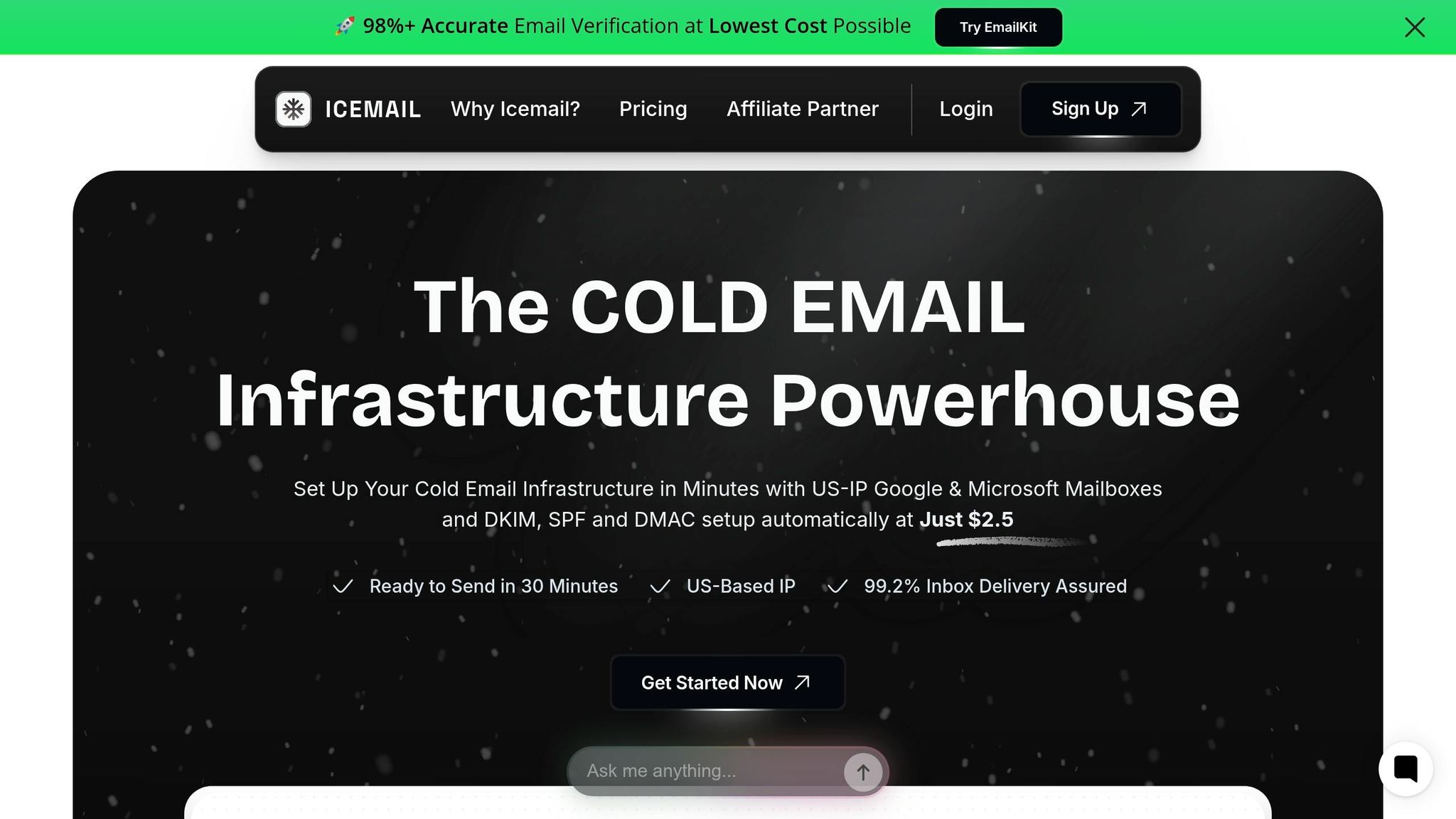
Icemail.ai takes the headache out of email infrastructure setup, letting you focus on crafting emails that connect. One of its standout features is affordability: the platform offers Google Workspace and Microsoft mailboxes for just $2.00–$3.00 each, compared to the $6.00+ price tag when purchasing directly from Google or Microsoft.
Setup is incredibly fast, taking only 10–30 minutes instead of the hours (or even days) you’d spend doing it manually. Icemail.ai automates everything, from configuring SPF, DKIM, and DMARC records to managing DNS settings and bulk mailbox setups.
The platform also uses US-based IP addresses and is an official Google partner, ensuring reliable infrastructure. With a 99.2% inbox delivery rate, your emails are far more likely to land in the primary inbox, avoiding the dreaded spam folder.
Icemail.ai vs Other Providers
Here’s how Icemail.ai stacks up against other providers like Google Workspace and Microsoft 365:
| Feature | Icemail.ai | Google Workspace | Microsoft 365 |
|---|---|---|---|
| Price per Mailbox | $2.00–$3.00 | $6.00+ | $6.00+ |
| Setup Time | 10–30 minutes | Hours/Days | Hours/Days |
| Authentication (SPF/DKIM/DMARC) | Automated | Manual | Manual |
| Cold Email Optimization | Yes | No | No |
| Inbox Delivery Rate | 99.2% | Variable | Variable |
| Mailbox Replacement | Unlimited Free | No | No |
This speed and simplicity are crucial when scaling your outreach. While other tools like Instantly.ai (which boasts a 4.8/5 rating on G2) offer strong analytics, Icemail.ai zeroes in on the foundation: infrastructure. Without a solid setup, even the best email copy won’t save your campaign.
“The gap between top and bottom [performers] isn’t copy. It’s data quality, targeting, and sending infrastructure”.
Conclusion
In 2026, a solid cold email reply rate typically falls between 5% and 10%, with top performers pushing past 10% by using precise targeting and well-optimized infrastructure. That said, the average reply rate hovers at just 3.43%, and only about 14.1% of those replies are positive. These numbers highlight plenty of room for improvement.
Achieving exceptional results isn't just about writing catchy subject lines. Factors like email deliverability, list quality, and technical setup play a huge role. For instance, having your SPF, DKIM, and DMARC properly configured can boost response rates by up to 30.5%. On the flip side, without these safeguards, roughly 17% of your emails may never even make it to an inbox.
Follow-ups are a game-changer. The first email typically accounts for 58% to 79.4% of replies, but adding just one follow-up can increase your overall response rate by 40% to 50%. Keeping your emails short (under 80 words), personalizing key details, and ensuring clean sending practices - like maintaining bounce rates below 2% and spam complaints under 0.3% - are vital for success. These tweaks can make your outreach efforts scalable and effective.
For those looking to scale, platforms like Icemail.ai simplify the process. With features like automated DNS management, a quick 10–30 minute setup, and a 99.2% inbox delivery rate, these tools take care of the technical side, letting you focus on crafting messages that connect with your audience.
"In 2026, cold email is about resonance, not reach. Reply rates remain stable despite growing volume proving that relevance, not quantity, drives conversations." – Instantly.ai
FAQs
Should I track reply rate or positive reply rate?
Tracking the positive reply rate is crucial because it highlights genuine engagement with your audience. This metric goes beyond just measuring activity - it helps you evaluate how effective your cold email campaign truly is. By focusing on positive replies, you can concentrate on what really matters: meaningful responses that drive results.
How many follow-ups is too many?
Sending more than nine follow-up emails often crosses the line into overkill. By this stage, response rates tend to level off, and there's a higher chance your messages could be flagged as spam. Instead of bombarding inboxes, prioritize crafting thoughtful, engaging emails that make each interaction count. Quality always beats quantity when it comes to building meaningful connections.
What technical fixes improve deliverability fastest?
To improve email deliverability, start by authenticating your emails using SPF, DKIM, and DMARC records. These protocols help establish trust with email providers and minimize the chances of your messages being flagged as spam. Also, when using a new domain, take 2-4 weeks to gradually warm it up. This process builds a solid sender reputation, making your emails more likely to land in inboxes rather than being filtered out.