How Forwarding Rules Impact Email Deliverability
How misconfigured forwarding breaks SPF, DKIM, and DMARC — and how ARC, SRS, and DMARC monitoring restore inbox placement.

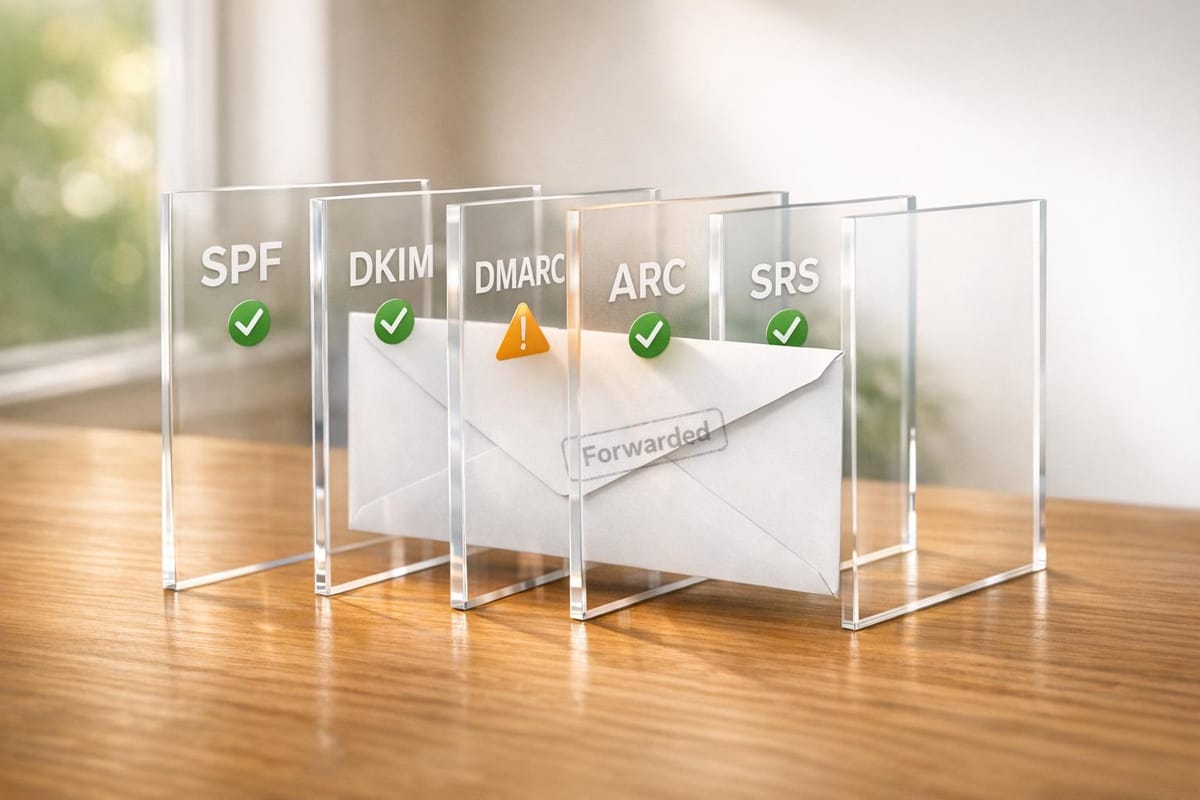
Email forwarding can hurt your deliverability if misconfigured. Forwarding changes the email's path, often breaking SPF, DKIM, and DMARC authentication protocols. When these fail, your emails are flagged as spam or rejected. Here's the key takeaway:
- SPF fails: The forwarding server’s IP isn’t authorized by the sender’s domain.
- DKIM breaks: Changes to the email (like footers) invalidate its cryptographic signature.
- DMARC fails: If both SPF and DKIM fail, the email violates DMARC policies, leading to spam or rejection.
To fix this:
- Use ARC (Authenticated Received Chain) to preserve authentication results across forwarding hops.
- Implement SRS (Sender Rewriting Scheme) to rewrite the sender address and pass SPF checks.
- Start with a
p=noneDMARC policy, monitor reports, and tighten gradually.
Solutions like Icemail.ai simplify mailbox setup and authentication to avoid these issues. Misconfigured forwarding doesn’t just block emails - it damages your domain’s reputation, making future campaigns harder. Fix these gaps to keep your emails out of spam folders.
How SPF and DKIM Work | Ep1 | Email Security Basics
How Forwarding Rules Break Email Authentication
When you forward an email, it takes an unexpected detour through an additional mail server that wasn't part of its original delivery path. This detour creates technical headaches for the three main email authentication protocols: SPF, DKIM, and DMARC. Understanding how each one falters during forwarding sheds light on why forwarded emails often land in spam folders.
SPF and DKIM Failures Caused by Forwarding
SPF (Sender Policy Framework) is the first to fail when emails are forwarded. SPF verifies whether the sending server's IP address is listed as authorized in the domain's DNS records. But when an email is forwarded, the forwarding server's IP becomes the sender, and this IP is almost never authorized by the original domain. The result? SPF fails instantly.
"SPF is a way for domain owners to authorize which hosts (IPs) can use their domain... When forwarding a message, you're telling your own mail host to send to a new recipient that the original sender didn't intend to deliver to." - Postmark
A 60-day study of 1.1 billion forwarded messages revealed that 73% of DMARC failures caused by forwarding were due to SPF breakage, especially when DKIM was missing or misaligned. This makes SPF the most fragile element in the forwarding process.
DKIM (DomainKeys Identified Mail) holds up better because it uses a cryptographic signature embedded in the email's content, bypassing the need for IP verification. However, DKIM isn't immune to failure. If an intermediary server, like a mailing list or security gateway, alters the email's body or headers, the DKIM signature becomes invalid. These modifications - such as adding footers or disclaimers - can break the signature.
The same study found that 21% of forwarding failures occurred because DKIM signatures were broken by such content changes. For instance, a high-volume SaaS company sending 40 million monthly emails experienced a 9% DMARC failure rate with Yahoo because partner mailing lists added footers that disrupted DKIM.
When SPF and DKIM fail, DMARC compliance falls apart too.
DMARC Policy Violations
DMARC (Domain-based Message Authentication, Reporting, and Conformance) ties everything together by requiring at least one of the protocols - SPF or DKIM - to pass and align with the "From" domain. Since forwarding almost always breaks SPF, DMARC relies entirely on DKIM to succeed. If both SPF and DKIM fail - SPF due to the IP mismatch and DKIM due to content alterations - the email violates the sender's DMARC policy.
The consequences depend on the sender's DMARC settings. A p=quarantine policy sends the email to the spam folder, while a p=reject policy blocks it entirely. If emails go through multiple forwarding hops, DMARC failure rates can skyrocket at major email providers. This means that a large number of legitimate forwarded emails might be flagged as suspicious or rejected outright.
For cold email campaigns, this is a big deal. If your prospects use forwarding rules to consolidate their inboxes, or if your emails pass through corporate security gateways acting as forwarders, your outreach efforts could be doomed. Even if your emails are perfectly crafted, they may never reach their intended recipients.
Business Impact of Misconfigured Forwarding Rules
Misconfigured forwarding rules don’t just cause technical headaches - they can derail outreach campaigns and tarnish your domain's reputation. When emails fail to reach their intended inboxes or end up flagged as spam, the consequences ripple through both current and future campaigns.
Lower Inbox Placement Rates
Forwarded emails often set off spam filters. Why? A mismatch between the "From" domain and the "Return-Path" domain can make the email look suspicious, resembling phishing attempts. If both SPF and DKIM fail, the receiving server enforces the sender's DMARC policy. Depending on the policy, emails might end up in spam (p=quarantine) or be blocked entirely (p=reject).
The stats paint a clear picture. A SaaS company sending 40 million messages monthly found that 9% of their emails to Yahoo failed DMARC checks due to partner mailing lists breaking DKIM signatures. By implementing ARC and adjusting to relaxed DKIM canonicalization, they reduced failures to just 1.7%.
Another scenario highlights the risks of forwarding without ARC. Emails that passed through two forwarding hops without ARC experienced a 41% DMARC failure rate at major providers. For cold email campaigns, this means a significant chunk of prospects - especially those using corporate forwarding or email consolidation services - may never see your messages. Over time, repeated authentication failures erode your domain's reputation, reducing inbox placement rates even for emails that aren’t forwarded. On top of that, misconfigurations make DMARC reporting harder to interpret, adding another layer of complexity to your security monitoring efforts.
DMARC Reporting Complications
Misconfigured forwarding doesn’t just hurt inbox placement - it also muddies the waters for monitoring and threat detection. DMARC reports become cluttered with IP addresses from intermediary servers like Gmail aliases or corporate gateways. This makes it tough to differentiate between legitimate forwarding failures and actual spoofing attempts.
"DMARC reports show you mail received with your domain in the 'From' address that wasn't authenticated by you, whether it's malicious or due to legitimate forwarding that breaks authentication in transit." - Michael Ko, Co-founder & CEO, Suped
The sheer volume of data can be overwhelming. Automatic forwarding through large mailing lists floods DMARC XML reports, making manual analysis nearly impossible. Forwarding issues are a major culprit: 73% of DMARC failures caused by forwarding stem from SPF-only failures, while 21% result from DKIM breakage due to content modifications. Without advanced tools to map delivery paths, your security team may waste valuable time chasing false positives - leaving real threats undetected.
How to Configure Forwarding Without Breaking Authentication
Maintaining forwarding rules while keeping SPF, DKIM, and DMARC intact requires careful implementation of specific protocols at key points in your email infrastructure.
Using ARC (Authenticated Received Chain)
ARC serves as a digital chain of custody for emails. Each server that handles a message - such as a forwarder, mailing list, or gateway - adds cryptographic signatures to preserve the original authentication results.
Here’s how it works: ARC adds three key headers at every hop. The ARC-Authentication-Results header logs the SPF, DKIM, and DMARC checks performed by the intermediate server. The ARC-Message-Signature cryptographically signs the message body and headers to detect tampering. Finally, the ARC-Seal ensures the integrity of all previous ARC headers, maintaining the chain of trust. This allows providers like Gmail and Outlook to verify the original authentication status, even if SPF fails due to IP address changes.
"ARC is like a signed chain of custody for email... it records what you verified on the inbound hop - SPF, DKIM, DMARC - and seals that record so downstream providers can decide whether to trust it." - DCHost.com Blog
Domains using ARC at major forwarders have reported improvements in DMARC performance. For example, Gmail and Outlook saw median DMARC failure rates on forwarded mail drop by 52% and 31%, respectively. Without ARC, messages traversing two hops experienced DMARC failure rates as high as 41%, which dropped to 12% when ARC was implemented end-to-end.
Implementation Tip: ARC is handled by the intermediary service forwarding the email, not the original sender. If you operate a forwarding server, consider tools like OpenARC (for Postfix/Sendmail) or Rspamd to implement ARC. As a sender, ensure your SPF and DKIM configurations are solid so the first ARC hop can log a "pass." Using relaxed/relaxed DKIM canonicalization (c=relaxed/relaxed) can help your signatures withstand minor changes during forwarding.
While ARC secures the authentication chain, SRS addresses SPF issues at the envelope level.
Implementing SRS (Sender Rewriting Scheme)
SRS rewrites the envelope sender (Return-Path address) to reflect the forwarding server’s domain. This happens invisibly at the server level, so the visible "From" address in email clients remains unchanged. By doing this, SPF checks validate the forwarding server’s IP address against its own SPF record, rather than the original sender’s. For bounced emails, SRS encodes the original sender’s address and a cryptographic hash into the rewritten address, ensuring the forwarding server can correctly route Non-Delivery Reports back to the sender.
Microsoft 365, for example, automatically applies SRS for messages forwarded externally. If you manage your own server, Postfix users can use the postsrsd daemon for SRS rewriting, while Exim users can enable the srs_encode feature. Deploying SRS at the first forwarding server can reduce SPF failures by up to 93% on the final hop.
Best Practice: Combine SRS with ARC for robust protection. SRS ensures SPF integrity at the envelope level, while ARC maintains the chain of custody for DMARC results - particularly useful when content modifications, like mailing list footers, disrupt DKIM.
To further strengthen your setup, monitoring with DMARC policies is essential.
Monitoring with DMARC Policies
ARC and SRS are complemented by proactive DMARC monitoring, which helps identify and address any remaining authentication issues caused by forwarding. Begin with a p=none DMARC policy to collect aggregate (RUA) reports without affecting email delivery. These reports allow you to identify legitimate forwarding sources that might disrupt authentication, separating them from actual spoofing attempts.
After a few weeks of analysis, gradually tighten your policy by moving to p=quarantine and eventually to p=reject. Use relaxed alignment for SPF (aspf=r) and DKIM (adkim=r) to account for common forwarding variations.
Regularly review RUA reports. Data shows that 73% of forwarding-related DMARC failures stem from SPF-only issues, often due to missing or misaligned DKIM. Another 21% result from DKIM breakage caused by content changes. Forwarded emails typically show SPF failures even when DKIM passes, so consistent failure of both may point to misconfiguration or spoofing attempts.
Cold Email Infrastructure Setup to Prevent Forwarding Issues
Setting up a proper email infrastructure is key to avoiding forwarding-related deliverability problems. A well-structured mailbox system not only prevents these issues but also helps maintain DMARC compliance. Below, we’ll explore common pitfalls with email aliases and the benefits of using dedicated mailboxes for better authentication.
Avoid Using Aliased Mailboxes
Using email aliases for outbound cold outreach can spell trouble. An alias is essentially a forwarding address without its own login credentials. If you attempt to log in directly, you might encounter an "Account not found" error or be redirected to a primary account. This creates a mismatch in the email's technical headers, where the visible "From" address doesn’t align with the actual sending domain. Such misalignment often triggers DMARC failures, which spam filters may interpret as spoofing attempts.
"If you cannot log in to the account directly with a unique password, it is an alias... For outbound sales, it is a deliverability death sentence." - Lucas Dezan, Demand Gen Manager, Allegrow
Another issue with aliases is that they share the sender reputation of the root domain. If one alias gets flagged during a campaign, it can jeopardize your entire company’s email infrastructure. To avoid this, perform a simple Login Test: try signing in to each outbound address using unique credentials. If login fails, it’s time to create a dedicated mailbox. For Google Workspace users, it’s better to use a "Secondary Domain" rather than a "User Alias Domain" to ensure independent authentication and a separate sender reputation.
For businesses handling large-scale email outreach, automated platforms can simplify this process.
Use Icemail.ai for Automated Email Infrastructure
When managing high-volume email campaigns, tools like Icemail.ai streamline infrastructure setup and ensure proper authentication. At just $2 per mailbox, Icemail.ai is an affordable option compared to competitors. It offers instant domain configuration and bulk update capabilities, making it easier to set up and manage multiple mailboxes.
Icemail.ai automates the provisioning of mailboxes and DNS configuration, with onboarding that takes just 10 minutes. The platform also enables 1-click setup for critical DNS records like DKIM, DMARC, and SPF. Unlike alias-based systems, Icemail.ai ensures each mailbox has independent authentication, eliminating header mismatches and protecting sender reputation.
Designed for both Google Workspace and Microsoft mailboxes, Icemail.ai supports instant domain setup and smooth scaling. For example, its 1-click mailbox export feature allows businesses to migrate mailboxes while preserving authentication settings - essential for scaling from 100 to 5,000 emails per day. Competing services like Mailreach or Woodpecker often require manual configuration to achieve similar results, making Icemail.ai a more efficient choice.
Comparison of Forwarding Authentication Methods
Email Forwarding Authentication Methods Comparison: ARC vs SRS vs DMARC
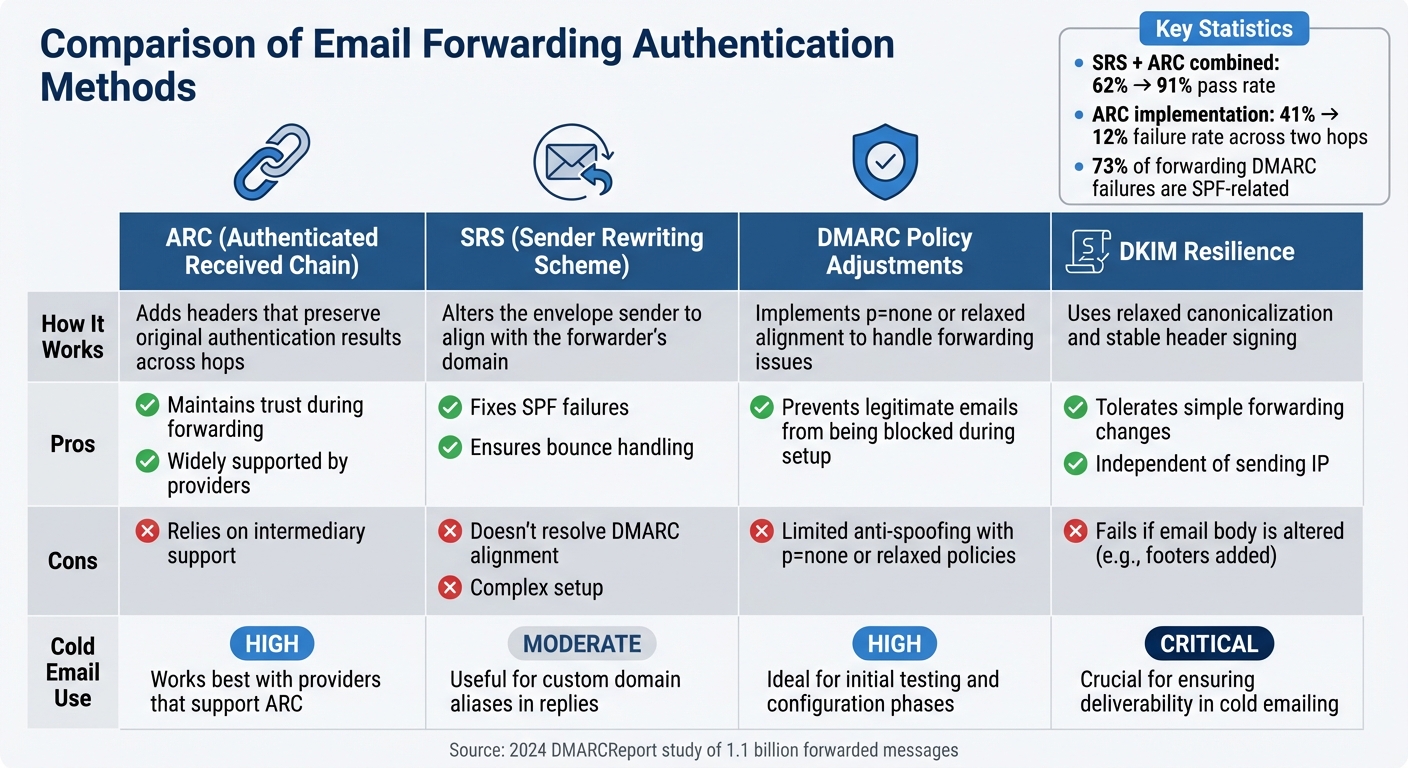
When email forwarding disrupts authentication, there are three main approaches to address the issue: ARC (Authenticated Received Chain), SRS (Sender Rewriting Scheme), and DMARC policy adjustments. Each tackles the challenge differently, making it easier to choose the right fit for your cold email setup.
ARC creates a secure chain of custody for authentication results as emails pass through intermediary servers. A 2024 DMARCReport study revealed that combining SRS and ARC boosted forwarded email pass rates from 62% to 91%. However, ARC depends on support from intermediaries. Let’s now look at how SRS addresses envelope-level challenges to improve forwarding security.
SRS resolves SPF failures by rewriting the envelope sender to match the forwarder’s domain. Since August 2023, Microsoft 365 has been automatically using SRS for external mailbox forwarding, which enhances SPF compatibility. That said, because the visible "From" header remains unchanged, SRS doesn’t address DMARC alignment issues.
DMARC adjustments, such as setting a p=none policy (monitoring mode) or using relaxed alignment, offer a straightforward fix but provide the least protection. For example, a SaaS company sending 40 million emails monthly saw a 9% DMARC failure rate at Yahoo due to partner mailing lists adding footers. After partners implemented ARC and the sender adopted relaxed DKIM canonicalization, the failure rate dropped to 1.7%.
Comparison Table: ARC, SRS, and DMARC Adjustments
| Method | How It Works | Pros | Cons | Cold Email Use |
|---|---|---|---|---|
| ARC (Authenticated Received Chain) | Adds headers that preserve original authentication results across hops | Maintains trust during forwarding and is widely supported by providers | Relies on intermediary support | High – works best with providers that support ARC |
| SRS (Sender Rewriting Scheme) | Alters the envelope sender to align with the forwarder’s domain | Fixes SPF failures and ensures bounce handling | Doesn’t resolve DMARC alignment; setup can be complex | Moderate – useful for custom domain aliases in replies |
| DMARC Policy Adjustments | Implements p=none or relaxed alignment to handle forwarding issues |
Prevents legitimate emails from being blocked during setup | Offers limited anti-spoofing with p=none or relaxed policies |
High – ideal for initial testing and configuration phases |
| DKIM Resilience | Uses relaxed canonicalization and stable header signing | Tolerates simple forwarding changes; independent of sending IP | Fails if the email body is altered (e.g., footers added) | Critical – crucial for ensuring deliverability in cold emailing |
This breakdown highlights the importance of DKIM resilience and the strategic use of ARC or SRS to improve cold email performance. Fine-tuning these methods is essential for maintaining inbox placement and safeguarding your sender reputation.
For cold emailers, DKIM resilience serves as a key defense. Using c=relaxed/relaxed canonicalization makes your signatures more tolerant to minor changes like whitespace or header modifications during forwarding. Platforms like Icemail.ai simplify this process by automatically optimizing DKIM configurations during onboarding. This ensures your authentication can withstand forwarding scenarios that might otherwise compromise manually set up systems. With Icemail.ai, you get fast, high-quality mailbox setups tailored for cold email campaigns.
Conclusion
Email forwarding doesn’t have to disrupt deliverability - if you understand how authentication protocols like DKIM and SPF work during intermediary hops. DKIM is resilient to content changes, while SPF tends to fail in these scenarios. Since DMARC only requires one protocol (DKIM or SPF) to pass and align with the "From" domain, preserving a valid DKIM signature is essential for successful email forwarding.
A staggering 73% of DMARC failures caused by forwarding stem from SPF issues, often due to misconfigurations or the absence of DKIM alignment. This highlights the importance of implementing both DKIM and SPF from the beginning. To tackle these issues, solutions like ARC (Authenticated Received Chain) and SRS (Sender Rewriting Scheme) can help. For example, using these tools has been shown to reduce DMARC failure rates from 41% to 12% across two hops.
For cold email campaigns, managing dozens or even hundreds of mailboxes amplifies these challenges. Manually configuring DKIM, ARC, and DNS records can be not only tedious but also prone to errors. Icemail.ai simplifies this process with automated DKIM, DMARC, and SPF setup, all completed in just 10 minutes. Its reliable infrastructure ensures your authentication protocols remain intact, even in tricky forwarding scenarios that could trip up manual setups.
To further strengthen your email authentication, a phased DMARC rollout is key. Start with a p=none policy and gradually move to stricter settings. Opt for c=relaxed/relaxed DKIM canonicalization to maintain valid signatures despite minor changes, and use DMARC reports to identify legitimate forwarding versus spoofing attempts.
For cold email campaigns, Icemail.ai also offers instant domain setup and bulk mailbox purchasing for platforms like Google Workspace and Microsoft. At just $2 per mailbox, it’s an efficient and affordable solution that lets you focus on crafting effective emails without worrying about authentication headaches.
FAQs
How can I tell if forwarding is breaking SPF, DKIM, or DMARC for my emails?
To determine if forwarding is causing issues with SPF, DKIM, or DMARC, take a close look at your DMARC reports. These reports can highlight problems such as SPF or DKIM failures or misalignment with the From domain. Forwarding commonly disrupts SPF because the original sending IP might not be authorized. DKIM can also run into trouble if headers or content are modified during the process.
To address these challenges, consider implementing tools like SRS (Sender Rewriting Scheme) to help with SPF or ARC (Authenticated Received Chain) to support DMARC validation. However, it's crucial to consistently monitor your DMARC reports to identify and address any discrepancies that arise.
Should I use ARC, SRS, or both to fix deliverability issues caused by forwarding?
Using ARC (Authenticated Received Chain) alongside SRS (Sender Rewriting Scheme) can be a powerful solution for tackling deliverability problems caused by email forwarding. ARC ensures that authentication results, such as DMARC alignment, are preserved as emails pass through multiple servers. Meanwhile, SRS adjusts sender addresses to make sure SPF checks remain valid. By combining these two protocols, you can effectively avoid common forwarding issues - like failures in SPF, DKIM, or DMARC - boosting the chances of your emails landing in the inbox.
What DMARC settings should I use to reduce false spam blocks from forwarded email?
To minimize false spam blocks when forwarding emails, it's important to configure DMARC to account for forwarding scenarios. Implement SRS (Sender Rewriting Scheme) to ensure SPF checks pass, and use ARC (Authenticated Received Chain) to maintain the validity of both DKIM and SPF. Begin with a less strict DMARC policy, such as "none" or "quarantine", to monitor results and fine-tune your settings. For a quick and efficient setup, services like Icemail.ai provide premium infrastructure designed to ensure dependable email deliverability.