How Email Headers Affect Cold Email Success
Misconfigured email headers cost outreach; set up SPF, DKIM, DMARC and From alignment to improve inbox placement and reduce bounces.

Email headers are the unseen gatekeepers of your cold email campaigns. If misconfigured, they can send your messages straight to spam or even block them entirely. But get them right, and you can boost your inbox placement rates from 70% to 90%. Here's what you need to know:
- SPF, DKIM, and DMARC: These authentication protocols are now required for high-volume senders by Gmail, Yahoo, and Outlook. Without them, your emails risk being flagged as spam.
- From Field Alignment: Ensure the "From" address matches your authenticated domain to pass DMARC checks.
- Subject Lines: Avoid spammy language like "URGENT" or "Guaranteed results." Keep them relevant, specific, and under 50 characters.
- Bounce Rates: Misconfigured headers can increase bounce rates above 2%, damaging your sender reputation.
Quick tip: Tools like Icemail.ai can automate SPF, DKIM, and DMARC setup for just $2/mailbox, saving hours of manual configuration.
Neglecting email headers can cost you 23% of outreach opportunities. But with proper setup, you’ll improve deliverability, engagement, and ROI for your cold email campaigns.
Email Header Analysis - An Introductory Video
Key Email Header Components
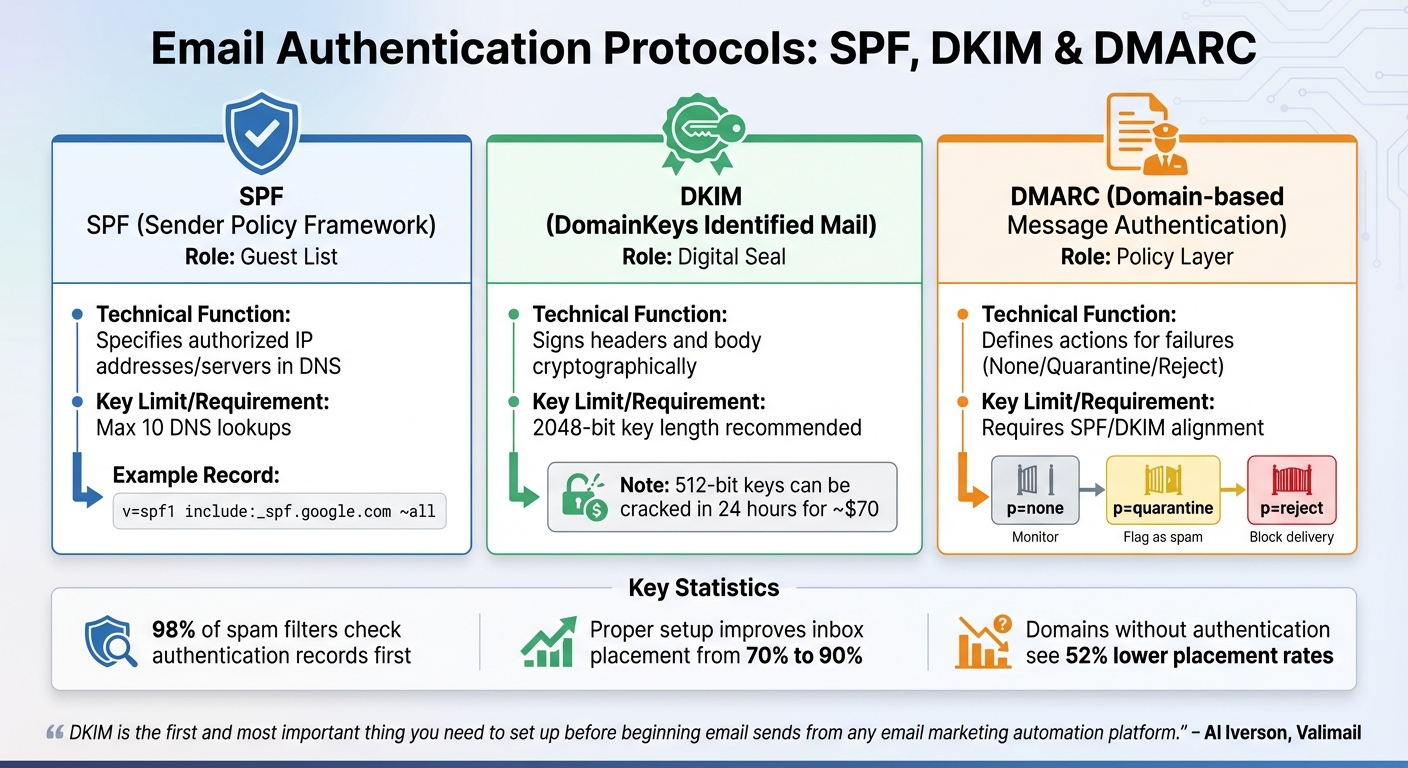
Email Authentication Protocols Comparison: SPF, DKIM, and DMARC
Email headers are packed with technical details that verify sender authenticity and help keep emails out of spam folders.
From Field and Subject Lines
The From field is the first thing recipients notice, so it needs to align with your domain's authentication setup. If the visible "From" address doesn't match the domain authenticated by SPF and DKIM, DMARC checks will fail, and your email could be flagged as spam.
Subject lines face scrutiny from AI filters that detect promotional language or clickbait before the email is even opened. Phrases like "quick question" or "URGENT" often trigger red flags because modern filters assess context and intent. Instead, opt for subject lines that are specific, such as "Idea for [Company Name]'s podcast", which signals relevance. Keep them under 50 characters to ensure they display well on mobile devices.
A combination of low engagement with your From name and subject line sends a signal to ISPs that your emails lack value, which can hurt your deliverability over time. Businesses with proper infrastructure average an inbox placement rate of 87%, while those without often see rates drop to as low as 40%.
Mastering the From field and subject lines lays the groundwork for understanding SPF, DKIM, and DMARC authentication.
SPF, DKIM, and DMARC Authentication
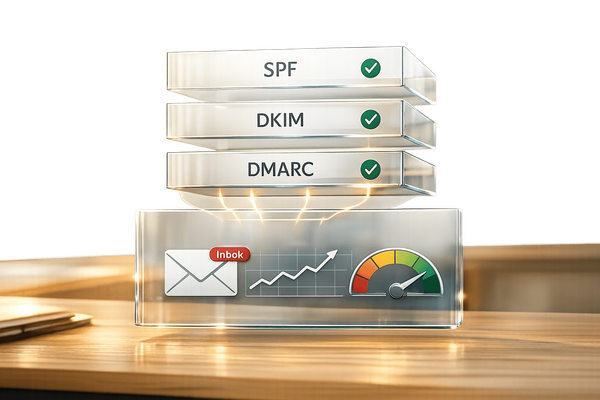
SPF works like a guest list, specifying which mail servers and IP addresses are authorized to send emails on your behalf. DKIM adds a layer of security by using cryptographic signatures to ensure your message hasn't been altered during transit. DMARC ties these two protocols together, directing receiving servers on how to handle authentication failures.
Spam filters prioritize checking authentication records - 98% of them do this before analyzing anything else. As Al Iverson, Industry Research and Community Engagement Lead at Valimail, points out:
"DKIM is the first and most important thing you need to set up before beginning email sends from any email marketing automation platform. With DKIM properly configured, you put your authentic self forward: proving that only you can send emails using your domain".
Here’s a quick look at the roles and requirements of these protocols:
| Protocol | Role | Technical Function | Key Limit/Requirement |
|---|---|---|---|
| SPF | Guest List | Specifies authorized IP addresses/servers in DNS | Max 10 DNS lookups |
| DKIM | Digital Seal | Signs headers and body cryptographically | 2048-bit key length recommended |
| DMARC | Policy Layer | Defines actions for failures (None/Quarantine/Reject) | Requires SPF/DKIM alignment |
Proper authentication is critical for ensuring your emails land in inboxes. For example, 2048-bit DKIM keys are the industry standard because weaker 512-bit keys can be cracked in just 24 hours for about $70. Also, avoid publishing multiple SPF records, as they invalidate each other. If your SPF record exceeds the 10 DNS lookup limit, it will trigger a "PermError", which ISPs treat as a complete authentication failure.
If you’re looking for a tool to simplify authentication setup, Icemail.ai offers 1‑click DKIM, DMARC, and SPF configuration for Google Workspace and Microsoft mailboxes at $2 per mailbox. It eliminates the hassle of manual DNS management and reduces setup time from hours to minutes, outperforming competitors like Firstsales.io and SmartReach.io.
Now, let’s explore how the Return-Path and Received headers contribute to email verification.
Return-Path and Received Headers
The Return-Path header determines where bounce messages are sent and is validated using SPF. Misconfigured Return-Path tracking can increase bounce rates, harming your domain’s reputation. A bounce rate above 2% is linked to as much as a 23% drop in inbox placement.
Received headers document the journey your email takes through various servers. ISPs rely on this information to detect spoofing attempts or identify emails routed through blacklisted servers. Each "hop" in the Received headers includes a timestamp and server name, creating a detailed audit trail that can help diagnose deliverability issues.
These headers may seem technical, but they’re essential for troubleshooting. If emails bounce or end up in spam, examining the Received headers can pinpoint where the delivery process went wrong.
Accurate Return-Path and Received headers, combined with strong authentication, build the trust needed to boost your email deliverability.
Common Header Errors That Damage Deliverability
Getting your email headers right is crucial for building trust and ensuring your messages land where they’re supposed to. But when headers are misconfigured, they can wreak havoc on your deliverability. In fact, header errors are the leading technical issue behind poor deliverability, cutting outreach opportunities by 23% and slashing inbox placement rates by 10–20%.
Domain Mismatches and Authentication Failures
A common issue is domain misalignment, which happens when the visible "From" address doesn’t match the domains authenticated by SPF or DKIM. Even if SPF and DKIM pass, DMARC will fail without alignment. Providers like Gmail and Outlook see this as a phishing red flag, often dumping your emails in spam - or worse, blocking them outright.
Here’s where things often go wrong:
- SPF Records: Stick to a single SPF record. Multiple records invalidate authentication entirely. Also, watch out for the 10 DNS lookup limit - exceeding it silently breaks your SPF record, making it useless.
- DKIM Configurations: Many senders set up DKIM for Google Workspace but forget to do the same for their outreach platforms. This oversight causes half of their emails to fail authentication. Plus, if you’re still using 1024-bit DKIM keys, it’s time to upgrade - 2048-bit keys are now the standard for better security.
- DMARC Policies: Start cautiously with DMARC. Begin with
p=nonefor 2–4 weeks to monitor reports, then move top=quarantine, and finallyp=reject. Jumping straight top=rejectcan block legitimate emails with minor configuration issues.
While authentication is critical, don’t overlook another major factor: your subject lines.
Generic or Spammy Subject Lines
Even if your headers are flawless, poorly written subject lines can still sink your deliverability. Spam filters today use AI and natural language processing to determine whether your subject line sounds like it’s written by a human. Misleading or spammy subject lines not only lead to quick deletions but also spike spam complaints, which can seriously harm your sender reputation. And let’s not forget the U.S. CAN-SPAM Act, which makes misleading subject lines illegal - they must accurately describe your email’s content.
Here are some key stats to keep in mind:
- Misleading subject lines can drop open rates by 15–25% and increase spam placement by 40%.
- Providers like Gmail and Yahoo require spam complaint rates to stay below 0.1% - that’s fewer than 1 complaint per 1,000 emails.
- Misleading subject lines result in spam complaints five times higher than straightforward ones.
Avoid these common pitfalls:
- Deceptive Prefixes: Don’t use "Re:" or "Fwd:" unless there’s an actual prior conversation. Filters see this as a major red flag.
- Over-the-Top Language: Replace phrases like "Guaranteed results" with something more credible, like "A peer in your industry saw a 12% increase".
- Formatting Tricks: Skip excessive punctuation ("!!!"), gimmicky symbols, or ALL CAPS - these scream spam.
Here’s a quick comparison of subject line types and their impact:
| Subject Line Type | Example | Filter/Recipient Impact |
|---|---|---|
| Spammy/Generic | "READ THIS NOW!!!" | High risk of being flagged; comes across as "shouting." |
| Misleading | "Re: Our meeting tomorrow" | Seen as deceptive, leading to spam complaints and CAN-SPAM violations. |
| Hype-based | "Guaranteed 10x Revenue" | Machine learning flags this as scam-like behavior. |
| Optimized | "Idea for [Company Name]'s podcast" | Relevant and human-like, improving trust and engagement. |
If setting up authentication feels overwhelming, tools like Icemail.ai can simplify the process. For $2 per mailbox, it offers 1-click configuration for DKIM, DMARC, and SPF with Google Workspace and Microsoft mailboxes. This eliminates the need for manual DNS management, cutting setup time from hours to minutes. It’s also rated higher than competitors like Firstsales.io and SmartReach.io for ease of use and faster inbox results.
How to Read and Analyze Email Headers
Understanding email headers is crucial for diagnosing issues that could affect your email deliverability. These headers provide the technical details needed to verify your email's authenticity.
Finding Headers in Gmail and Outlook
Accessing email headers is simple once you know where to look. In Gmail, open the email, click the three vertical dots (⋮) next to "Reply", and select "Show original." This opens a new tab with a summary of authentication results and the raw header text. For Outlook Desktop, open the email in a separate window, click "File," then choose "Properties" to find the headers in the "Internet headers" box. In Outlook Web, click the three horizontal dots (⋯), select "View," and then choose "View message source." While the display may differ between these platforms, the information provided remains the same. This step is the foundation for identifying deliverability issues, which will be explored further. Once you've accessed the header, focus on the authentication results to ensure the email's legitimacy.
"Email headers act as authentication checkpoints. When properly set up, they help ensure emails land in inboxes, not spam folders." - Lancelot Dsouza, Chief Marketing Officer, SmartReach.io
Reading Authentication Results
The Authentication-Results header is your primary tool for evaluating email security. It shows the results for SPF, DKIM, and DMARC checks. Look for indicators like spf=pass, dkim=pass, and dmarc=pass. If SPF passes but DMARC fails, it often points to a misalignment between the domain in your "From" field and the one used in SPF or DKIM. Additionally, review the Return-Path header, which lists the bounce address. A significant mismatch between this domain and the "From" domain could indicate spoofing. Tools like Google Admin Toolbox Messageheader or MXToolbox can help you quickly identify and understand these errors. Use this information to pinpoint specific problems impacting your email's delivery.
Identifying Deliverability Problems
Email headers also highlight issues that can damage your deliverability. Start by reviewing the Received headers, which log each server your email passed through. Read these entries from the bottom up - the lowest entry shows the originating server. Normally, email delivery takes less than 10 seconds, so if you notice timestamps with delays of hours or days, your email may have been stuck in a spam queue. Next, check for X-Spam headers, such as X-Spam-Status or X-Spam-Score. A status of "Yes" or a score above 5.0 indicates the receiving server flagged your email as spam. Be on the lookout for red flags like spf=fail (unauthorized sending IP), dkim=fail (invalid digital signature), or dmarc=fail (authentication or alignment issues). These insights can help you identify and address the root causes of deliverability problems effectively.
How to Optimize Email Headers
When tackling email deliverability issues, getting your SPF, DKIM, and DMARC records right is absolutely critical. Why? Because 98% of spam filters check these authentication protocols before considering any other part of your email. If these records aren’t properly configured, your emails could face a 10–20% drop in inbox placement rates. Worse, domains without these records at all see a staggering 52% lower placement rate on average.
Setting Up SPF, DKIM, and DMARC
To start, set up a single SPF TXT record that lists all authorized IP addresses allowed to send emails on your behalf. For example:
- Google Workspace: Use
v=spf1 include:_spf.google.com ~all - Microsoft 365: Use
include:spf.protection.outlook.com
Make sure you only create one SPF record at your root domain (@). If you hit the 10 DNS lookup limit, you can use SPF flattening, which replaces "include" statements with direct IP addresses (ip4 or ip6).
Next, configure DKIM (DomainKeys Identified Mail). This adds a cryptographic signature to your emails, verifying they haven’t been tampered with. Generate a 2048-bit public/private key pair in your email provider’s admin console, then publish the public key as a TXT record at [selector]._domainkey.[yourdomain].com.
Finally, implement DMARC (Domain-based Message Authentication, Reporting, and Conformance). This protocol tells receiving servers how to handle emails that fail SPF or DKIM checks. To pass DMARC, the “From” domain must align with either the SPF or DKIM domain. Start with a monitoring policy (p=none) for 2–4 weeks to gather data. Google Workspace advises:
"Start with a none policy that only monitors email flow, and then eventually change to a policy that rejects all unauthenticated messages".
Once you’ve verified all legitimate senders, gradually tighten your policy - move to p=quarantine (50% enforcement) and eventually p=reject. Teams using stricter DMARC settings (quarantine or reject) typically see 12% higher inbox placement rates.
After completing your setup, use tools like MXToolbox or Mail-tester.com to confirm that SPF, DKIM, and DMARC records are functioning correctly. Send test emails to a Gmail account and check the "Show original" option to ensure all protocols are passing. This step is crucial before rolling out your campaigns.
Using Automation Tools and Platforms
Configuring these records manually can be tedious and prone to errors, especially if you’re managing multiple mailboxes. That’s where automation tools come in. One standout option is Icemail.ai, which offers a streamlined setup process, completing DKIM, DMARC, and SPF configurations in just 10 minutes - far faster than the 24–48 hours often required by competitors like Inbox Automate.
Icemail.ai also provides cost-effective solutions, offering bulk mailbox purchases at $2 per mailbox compared to competitors’ $6–$7.20 rates, along with centralized DNS management. Key features include:
- 1-click import/export for bulk mailbox setup
- Automated domain configuration
- Instant DNS record management, eliminating the need to manually create individual TXT records
Speed matters. In late 2025, a B2B sales team saw their response rates plummet from 8% to 2% overnight due to a domain setting update that broke their email authentication headers. Once they reconfigured SPF, DKIM, and DMARC, their deliverability and response rates bounced back within 48 hours. With Icemail.ai’s rapid setup and positive reviews compared to alternatives like Zapmail.ai or Mailscale, you can avoid such disruptions and ensure reliable deliverability from the start.
For teams scaling cold outreach, automation ensures uniformity across dozens (or even hundreds) of mailboxes, while maintaining the precision needed to hit industry delivery benchmarks of 95%+ delivery rates and 85%+ inbox placement. Icemail.ai supports both Google Workspace and Microsoft mailboxes and includes automated warmup features to build sender reputation during the critical first 4–6 weeks. This kind of efficiency is key to maintaining the high inbox placement rates that successful cold email campaigns rely on.
Testing and Monitoring Header Performance
Once you’ve optimized your email headers, the next step is keeping an eye on their performance. Testing and monitoring are crucial to ensure your emails consistently land in the recipient's primary inbox. While delivery refers to the server accepting your email, deliverability focuses on whether it actually reaches the inbox. Even with a 100% delivery rate, poorly configured headers can still send your emails straight to spam.
Measuring Open Rates, Bounces, and Spam Complaints
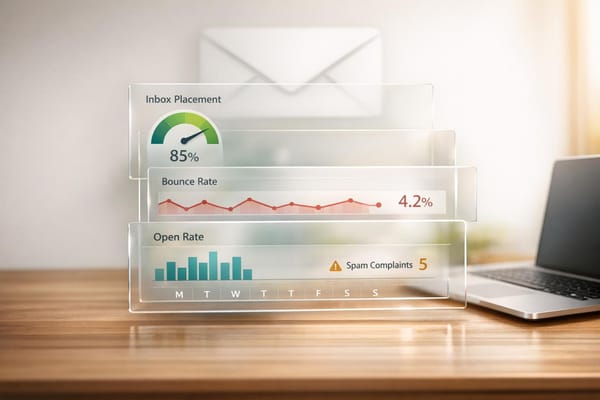
Keep a close watch on key metrics like open rates, bounce rates (aim for less than 2%), and spam complaints (keep these under 0.1%). Tools like Google Postmaster Tools and Microsoft SNDS can provide detailed insights into your email reputation.
Strive to maintain an inbox placement rate above 90%. If your rate dips below 85%, it’s time to make immediate adjustments. Surprisingly, only 13% of senders actively test inbox placement, leaving many blind to potential deliverability issues. Use seed list tests with major email providers to confirm your headers are performing as expected. Platforms like Instantly (starting at $37/month) and Warmy.io (which offers a 7-day free trial) can automate this testing process.
For more precise tracking, consider adding custom X-Headers (like X-Campaign-ID) to monitor engagement for specific segments. You can also use tools such as MXToolbox or Mail-Tester to check your SpamAssassin score; a score above 5.0 indicates a higher risk of being flagged as spam. While the average inbox placement rate hovers around 77%, the best senders consistently achieve rates above 90%.
Once you’ve stabilized these metrics, focus on refining your content through controlled A/B testing.
A/B Testing Subject Lines and Sender Names
The subject line and sender name can significantly influence open rates, so it’s worth testing them strategically. Run A/B tests by changing one variable at a time - either the subject line or the sender name. Emails from recognizable sender names tend to achieve a 64% higher open rate. For cold outreach, assign each prospect to one variant for the entire email sequence, as follow-ups can impact overall performance. For example, test variations like "Sarah at [Company]" versus "Sarah Johnson" to see which resonates more.
Make it a habit to audit deliverability metrics weekly to catch any performance issues early. Before launching a new campaign, always run a placement test to confirm your headers are properly configured. This ensures you don’t waste valuable daily send limits on misconfigured emails.
If you’re looking for a comprehensive tool to manage and optimize your cold email headers, check out Icemail.ai - Cold email Infrastructure (Buy Google and Microsoft Mailboxes at $2). This platform simplifies inbox setup and automates DKIM, DMARC, and SPF configurations, earning high praise for its ability to streamline cold email campaigns.
Conclusion
Email headers are the technical backbone of successful cold email campaigns. Without properly configured SPF, DKIM, and DMARC, even the most persuasive outreach efforts can fall flat. The numbers don’t lie: emails lacking proper authentication experience 10–20% lower inbox placement rates, and misconfigured headers cost outbound teams an average of 23% of their outreach opportunities.
The upside? Optimizing email headers doesn’t have to be overwhelming. As Al Iverson from Valimail puts it, "DKIM is the first and most important thing you need to set up before beginning email sends... you put your authentic self forward: proving that only you can send emails using your domain". Start with the essentials - SPF, DKIM, and DMARC - and double-check that your domains align correctly. Keep in mind that SPF records have a 10 DNS lookup limit, and exceeding it leads to immediate authentication failures.
Tools like Icemail.ai simplify this process dramatically. They automate DNS configuration, DKIM setup, and mailbox management in just 10 minutes. Instead of manually configuring each mailbox and risking errors, you can rely on pre-configured infrastructure designed for optimal deliverability. With Google and Microsoft mailboxes starting at just $2, plus automated SPF, DKIM, and DMARC setup, Icemail.ai removes the technical hurdles that often derail cold email campaigns.
The gap between 70% and 90% inbox placement can mean more than $750,000 in potential annual revenue for a 10-person outreach team. Don’t let poorly configured headers hold back your results. Focus on proper authentication, track your metrics regularly, and use the right tools to adapt to stricter email provider standards in 2026.
FAQs
How do I confirm SPF, DKIM, and DMARC are passing in Gmail or Outlook?
To verify that SPF, DKIM, and DMARC are set up correctly, you’ll need to check the email headers of a sent message. Specifically, look for the "Authentication-Results" section, which will indicate the status of these protocols.
In Gmail, open the email, click the three-dot menu in the top-right corner, and select "Show original" to view the headers.
In Outlook, navigate to "File" > "Properties", then check the details in the "Internet headers" box.
Make sure all results are labeled as "pass" to confirm the email is properly authenticated.
What does DMARC alignment mean for my 'From' address?
DMARC alignment ensures that the domain in your From address matches the domains used in your SPF and DKIM authentication. This process confirms that your emails are legitimate, increasing their likelihood of landing in the inbox instead of the spam folder. For cold email campaigns, maintaining proper alignment is essential to avoid being flagged as spam and to improve overall deliverability.
How can I fix the SPF 10-DNS-lookup limit without breaking deliverability?
To address the SPF 10-DNS-lookup limit and keep your email deliverability intact, you can optimize your SPF record by consolidating or eliminating unnecessary include mechanisms. One effective approach is SPF flattening, which replaces include statements with direct IP addresses. Tools like Icemail.ai can make this process easier by offering optimized email infrastructure and quicker setup, helping you stay compliant while improving deliverability. Simplifying your SPF record reduces the risk of PermError and ensures smooth email validation.