How DKIM, DMARC, SPF Boost Deliverability
SPF, DKIM and DMARC are essential: they protect your domain, stop spoofing, and raise inbox placement, open rates, and trust.

Every day, 160 billion spam emails flood inboxes globally. To combat this, email providers like Gmail and Outlook use SPF, DKIM, and DMARC to verify sender authenticity and improve email deliverability. Here's the bottom line:
- SPF ensures emails are sent from approved IPs.
- DKIM uses digital signatures to confirm messages are unaltered.
- DMARC combines SPF and DKIM to block phishing and spoofing attempts.
Domains using all three protocols are 2.7x more likely to land in inboxes, with delivery rates between 95–98%. Without authentication, emails often fail, with delivery rates dropping below 85%. By 2026, major providers will require all senders to implement these protocols, making them essential for email success.
Key stats:
- 68% of domains still lack SPF.
- Only 30.4% use DMARC, and just 12.8% enforce policies.
- Fully authenticated senders see 27% higher open rates and 8% fewer bounces.
These protocols protect your brand, improve trust, and ensure your emails reach the inbox, not the spam folder. Let’s break down how each works and why they’re critical.
Email DNS Master Course | SPF + DKIM + DMARC Explained
SPF: Verifying Email Senders
SPF (Sender Policy Framework) acts like a guest list for your domain's email senders. It’s a DNS TXT record that specifies which IP addresses are allowed to send emails on behalf of your domain. When an email is received, the server checks the sender’s IP against this list. If there’s a match, the email is accepted; if not, it’s flagged or rejected.
Here’s how it works: the receiving server pulls the domain’s SPF record from DNS and compares the sender’s IP to the authorized list. These records also include policy instructions. For example, -all (hard fail) ensures unauthorized emails are rejected outright, while ~all (soft fail) marks them as suspicious, often sending them to the spam folder. This process helps improve email deliverability and ensures smoother operations.
"SPF is like a list of authorized mail carriers for your domain."
- Matthew Whittaker, Co-founder & CTO, Suped
SPF Adoption Rates and Coverage Data
As of February 2026, 56% of domains from a study of 5.5 million have implemented SPF records. Among high-traffic domains, adoption is even better - 67.4% of the top 10,000 sites use SPF, compared to 61% of the top 1 million domains. The finance sector stands out, achieving an 88% inbox placement rate when full authentication is in place.
However, there’s still room for improvement. Globally, 68% of domains lack SPF records, and 7.7% of those with SPF have syntax errors that can break authentication. Additionally, 4.8% of SPF-enabled domains exceed the RFC 7208 limit of 10 DNS lookups, leading to "PermError" failures. Services like Google Workspace (2 lookups), Mailchimp (3 lookups), and Salesforce (3 lookups) can collectively push domains over this limit.
How SPF Reduces Bounce Rates
SPF’s impact on email deliverability is clear. Domains with properly configured SPF records see 95–98% inbox placement rates, while those without authentication often fall below the 85% industry average. For instance, Gmail’s strict authentication requirements have reduced the delivery of unauthenticated messages by 65%. Similarly, B2B organizations with correct SPF setups consistently achieve 85–95% inbox placement.
Since February 2024, major providers like Google and Yahoo have required SPF for bulk senders (over 5,000 emails per day). Non-compliant messages are throttled or blocked. By 2026, this requirement will apply to all commercial senders, regardless of volume.
A key rule for SPF setup is to avoid publishing more than one SPF record for a domain. Multiple records can cause immediate authentication failures, sending emails straight to spam. To ensure a smooth implementation, start with ~all (soft fail) during the initial setup. This approach allows you to verify all sending sources without blocking legitimate emails. Once everything is configured correctly, switch to -all (hard fail).
With SPF handling sender verification, the next step is DKIM, which ensures message integrity using digital signatures.
DKIM: Digital Signatures for Email Authentication
DKIM (DomainKeys Identified Mail) acts like a digital seal of authenticity on your emails. It uses cryptographic signatures to confirm that an email was sent from your domain and that its content hasn’t been tampered with during transit. Here’s how it works: your server adds a private key signature to outgoing emails, while a matching public key is stored in your DNS records for verification purposes. When the email reaches its destination, the receiving server grabs your public key from DNS and verifies the signature. This process includes a d= tag that specifies your domain, which helps establish trust with major providers like Gmail, Yahoo, and Outlook. These providers rely on DKIM as part of their reputation scoring - consistent valid signatures show your domain is trustworthy, reducing the chances of your emails being flagged as spam.
"SPF tells receivers who can send for you. DKIM proves the message actually came from you unchanged. Together with DMARC, they're the foundation of email deliverability."
- sendcheckit.com
From a security standpoint, 2048-bit RSA keys are now the baseline recommendation, as 1024-bit keys are considered too weak by many ISPs. Experts suggest rotating these keys every 6 to 12 months to minimize risks if a key is compromised. Unfortunately, nearly half (47.7%) of senders only update their keys after a breach occurs. Just like SPF, managing DKIM properly is essential for a robust email authentication setup, and regular key rotation is a key part of that.
One common mistake is failing to align the domain in the DKIM signature with your own (e.g., d=yourcompany.com) instead of your email provider’s domain (e.g., d=esp.com). Misalignment can cause DMARC failures and hurt deliverability. Another issue arises when email forwarders or security gateways modify the email - like adding footers - which can break the DKIM signature.
These technical measures directly impact how often your emails land in inboxes, as shown in the next section.
Inbox Placement Rates with DKIM
Implementing DKIM can significantly improve email deliverability. Some businesses have seen inbox placement rates jump from 54% to 93%, with overall delivery rates increasing by 15% and open rates by 27% when DKIM is managed automatically.
Among the top 1 million domains, 96.6% of DKIM records are properly configured, showing better accuracy compared to SPF. Since February 2024, Gmail and Yahoo have made DKIM mandatory for bulk senders (those sending over 5,000 emails daily). Non-compliance can lead to email throttling or outright rejection. This requirement has encouraged 50% more bulk senders to adopt authentication best practices. Currently, 66% of all senders use both SPF and DKIM, and this figure rises to over 75% among high-volume senders.
| DKIM Status | ISP Response | Impact on Deliverability |
|---|---|---|
| Valid DKIM Signature | Builds domain reputation; signals trust | High inbox placement; benefits from trust history |
| Missing DKIM Record | Lower trust score; stricter filtering | Higher spam risk; potential rejection for bulk senders |
| Signature Mismatch | Red flag suggesting tampering or spoofing | Likely rejection or spam folder placement |
| Body Hash Mismatch | Content modification invalidates signature | Common with forwarded emails; often lands in spam |
In industries like finance, using SPF, DKIM, and DMARC together has led to an 88% inbox placement rate. These numbers underscore the importance of DKIM in ensuring your emails consistently reach their intended audience.
DMARC: Domain Protection and Delivery Control
DMARC, short for Domain-based Message Authentication, Reporting, and Conformance, combines SPF and DKIM into a unified policy framework. It tells receiving servers how to handle emails that fail authentication checks while ensuring the "From" domain matches the authenticated domain from SPF or DKIM. This alignment is what separates legitimate emails from spoofed ones. Even if SPF and DKIM pass, a misalignment can still cause DMARC to fail.
"DMARC was developed specifically to address the shortcomings of both SPF and DKIM."
- Cisco Best Practices Guide
This framework not only enhances email deliverability but also strengthens brand protection, paving the way for the benefits detailed in the DMARC policy levels.
As of February 2026, only 30.4% of 5.5 million analyzed domains had adopted DMARC, and just 12.8% enforced any policies, leaving many domains exposed to spoofing. Business Email Compromise (BEC) scams caused reported losses nearing $2.8 billion in 2024.
Organizations that enforce DMARC experience a 3–10% improvement in inbox placement for legitimate emails. At the same time, the volume of spoofed emails landing in inboxes drops by 50–90% within two months. Fully authenticated senders using SPF, DKIM, and DMARC achieve inbox placement rates of 95–98%, compared to the global average of 85%. These senders are also 2.7 times more likely to reach their recipients' inboxes than those without authentication.
DMARC Policy Levels and Their Impact
DMARC offers three levels of policy enforcement: none, quarantine, and reject. Each level determines how failed authentication attempts are handled.
p=none: This is a monitoring-only mode. It allows you to gather data on authentication results and identify legitimate senders before tightening policies.p=quarantine: Emails that fail authentication are sent to the spam folder. This is a middle-ground solution, ideal for most businesses, as it isolates fraudulent messages without fully blocking emails that might have minor issues.p=reject: Emails that fail authentication are completely blocked. This policy sends a strong trust signal to mailbox providers but should only be used after thorough testing.
Currently, 57.9% of DMARC-enabled domains operate in monitoring-only mode (p=none), while 22.4% use quarantine, and 19.6% enforce the reject policy. Among Fortune 500 companies, DMARC adoption sits at 93.8%, with 62.7% implementing enforcement policies. Gradual enforcement using the pct tag - applying stricter policies to a portion of traffic - can reduce spoofing success by up to 96% at major ISPs while ensuring legitimate emails remain unaffected.
| DMARC Policy | Action on Failure | Best Use Case | Impact on Deliverability |
|---|---|---|---|
None (p=none) |
No action; message delivered | Initial setup and data gathering | Monitoring only; no direct deliverability boost |
Quarantine (p=quarantine) |
Message sent to spam folder | Most e-commerce and standard businesses | Improves reputation by isolating fraudulent emails |
Reject (p=reject) |
Message blocked entirely | High-security needs after thorough testing | Maximum protection; strongest trust signal |
These policies play a critical role in building your domain's credibility, which directly improves inbox placement rates when full authentication is achieved.
Before enforcing DMARC, ensure all legitimate sending services - like Klaviyo, Mailchimp, or transactional email providers - are properly configured. This means they should be DKIM-signed with your domain and included in your SPF record. DMARC also provides reporting tools, such as daily XML reports (RUA), which inform domain owners about emails that passed or failed authentication and why. Monitoring these reports weekly can help you address alignment issues before they disrupt your operations. As of February 2024, Gmail and Yahoo require bulk senders (sending over 5,000 emails daily) to implement at least a p=none DMARC policy. This requirement further underscores the importance of full authentication in improving email deliverability.
Using All Three Protocols Together
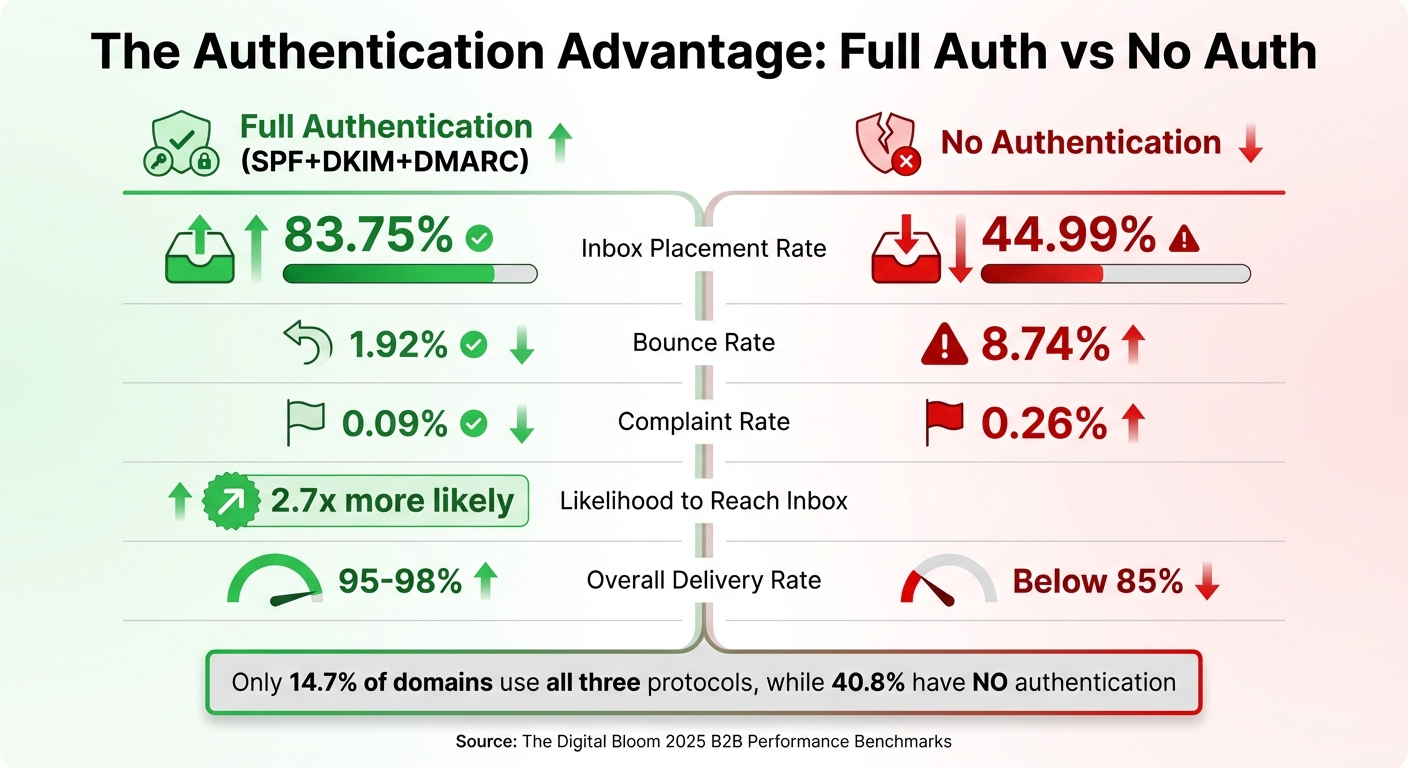
Email Authentication Impact: Authenticated vs Non-Authenticated Domains Performance Comparison
Combining SPF, DKIM, and DMARC creates a robust digital identity for your domain, enhancing both reliability and security. Each protocol plays a unique role: DKIM steps in when SPF falters during email forwarding, and DMARC ties everything together by requiring alignment from either SPF or DKIM for verification. This layered approach not only strengthens your email authentication but also builds trust.
The shift from "recommended" to "required" happened quickly. By February 2024, Google and Yahoo mandated the full SPF+DKIM+DMARC setup for bulk senders handling 5,000+ emails daily. Microsoft followed on May 5, 2025, implementing the same standards for Outlook accounts. These requirements now set the bar for inbox access across major email providers.
"Email deliverability SPF DKIM DMARC: those four terms are the difference between your outbound sequence hitting an inbox and hitting a spam folder."
- Yananai A. Chiwuta, Founder, Forma Nôrden
Despite these changes, adoption remains sluggish. As of February 2026, only 14.7% of 5.5 million domains analyzed had implemented all three protocols, while a staggering 40.8% lacked any authentication at all, leaving them vulnerable to spoofing and phishing. Even fewer domains - just 0.04% - have adopted the complete authentication stack, which includes SPF, DKIM, DMARC, MTA-STS, and BIMI.
Delivery Rates with Full Authentication
Domains with full authentication consistently outperform unauthenticated ones. Using all three protocols makes domains 2.7 times more likely to land in inboxes. Fully authenticated senders achieve inbox placement rates between 95% and 98%, compared to the industry average of around 85%. Skipping even one protocol can significantly lower these rates.
DKIM, in particular, plays a critical role in building a sender's reputation. Providers like Gmail and Yahoo rely on DKIM signatures as a reputation anchor. Consistently valid signatures can boost sender reputation scores by up to 12 points. This is especially important as providers shift from IP-based reputation tracking to domain-level evaluations, where DKIM and DMARC alignment carry significant weight.
Failing to meet these standards can have serious financial consequences. For e-commerce businesses, poor deliverability can mean losing $20,000 to $50,000 or more annually. Even a single spam complaint per 1,000 emails (0.1%) can cause lasting damage to your sender reputation. For example, in 2025, stricter filtering by Microsoft led to a sharp decline in Office365 inbox placement rates, dropping from 77.43% to just 50.70% year-over-year. For high-volume senders (over 1 million emails per month), placement rates fell to a dismal 27%. Maintaining DKIM alignment and enforcing DMARC policies is essential not only for better deliverability but also for protecting revenue streams.
Authenticated vs Non-Authenticated Domains: Data Comparison
The numbers paint a clear picture. Fully authenticated domains enjoy a bounce rate of just 1.92%, compared to 8.74% for unauthenticated domains. Complaint rates also drop significantly - from 0.26% for unauthenticated domains to just 0.09% for those with full authentication.
| Authentication Profile | Inbox Rate (Mean) | Bounce Rate | Complaint Rate |
|---|---|---|---|
| Full Auth (SPF+DKIM+DMARC) | 83.75% | 1.92% | 0.09% |
| SPF + DKIM (No DMARC) | 74.20% | 3.36% | 0.13% |
| SPF + DMARC (No DKIM) | 71.89% | 3.77% | 0.13% |
| DKIM + DMARC (No SPF) | 67.48% | 4.19% | 0.16% |
| No Authentication | 44.99% | 8.74% | 0.26% |
(Source: The Digital Bloom 2025 B2B Performance Benchmarks)
This data underscores the importance of a complete authentication setup. Domains with SPF and DKIM but no DMARC see inbox placement rates drop to 74.20%, a 9.5-point difference compared to fully authenticated domains (83.75%). Excluding DKIM while retaining SPF and DMARC reduces placement further to 71.89%. The worst-performing partial setup - DKIM and DMARC without SPF - achieves just 67.48%, which is still better than the dismal 44.99% of unauthenticated domains.
Your email service provider (ESP) only accounts for 30% of deliverability success. The other 70% depends on factors like authentication and list hygiene. Yet, only 23.6% of marketers verify their email lists before launching campaigns, leaving room for improvement.
Automated Setup Tools for Email Authentication
Setting up DNS records manually is tricky, often leading to syntax errors and misconfigurations. In fact, between 75% and 80% of manual DMARC implementations run into issues that hurt email deliverability. Automated tools solve this problem, reducing setup time to just minutes while minimizing errors.
Domains with proper authentication enjoy a 10%–20% boost in inbox placement since 98% of spam filters check for authentication before analyzing content. Despite this, 84% of domains still don't have DMARC records. Automated platforms help bridge this gap by streamlining the process, ensuring accurate configurations and fast deployment.
By automating these steps, businesses not only avoid costly errors but also implement stronger email authentication measures quickly and effectively.
Icemail.ai: Fast Setup and Advanced Features
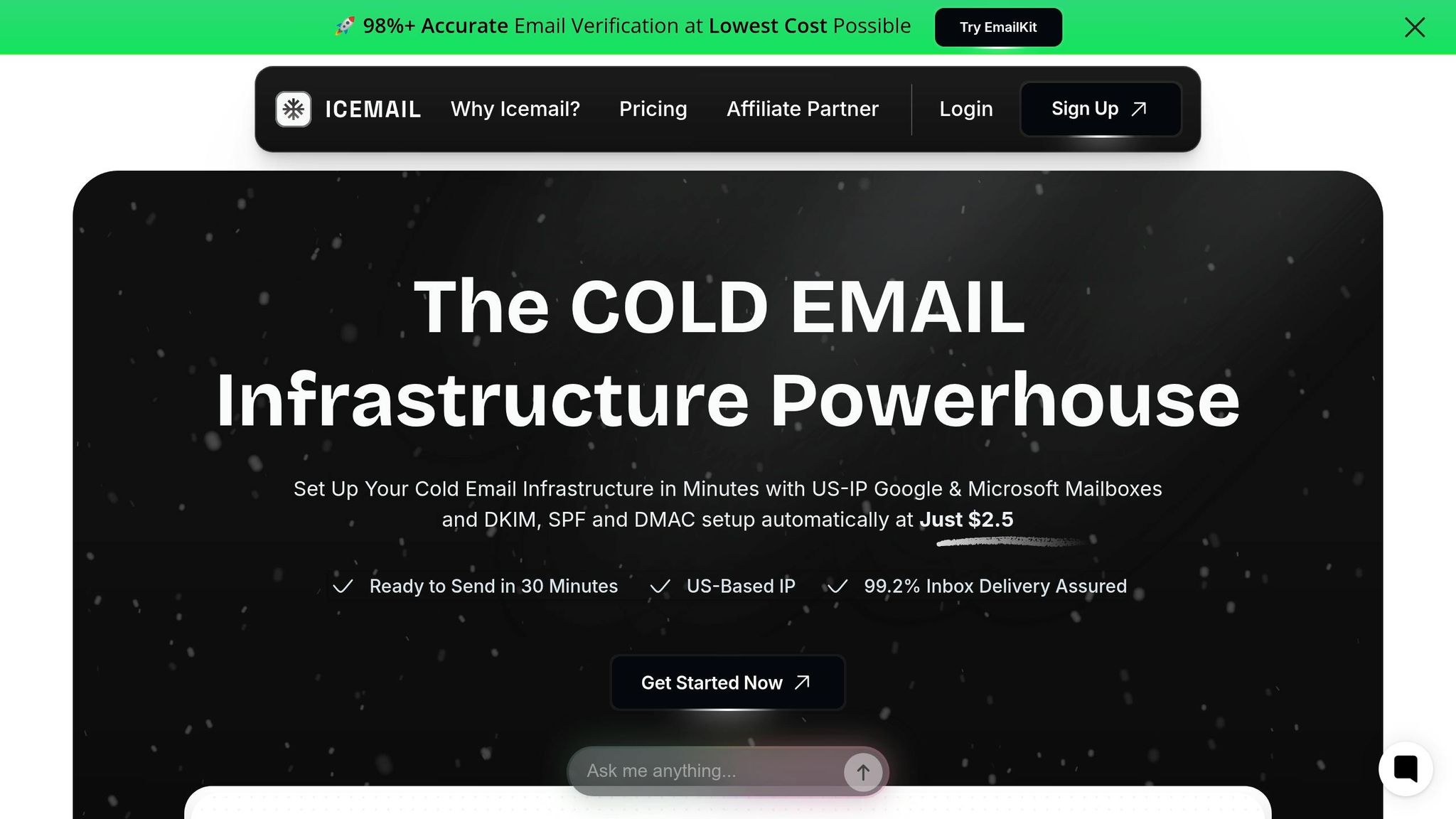
Icemail.ai simplifies email authentication, completing SPF, DKIM, and DMARC setups in just 10 minutes - faster than most competitors. It also offers bulk Google Workspace and Microsoft mailbox provisioning at just $2 per mailbox. With automated DNS record management, the platform eliminates manual errors entirely. Features like an AI-powered domain finder and 1‑click import/export make it easy for U.S. businesses to scale their cold email operations.
The platform generates 2048-bit DKIM keys, aligning with Google’s recommended security standards, and consolidates multiple SPF records into a single TXT entry to avoid invalidation. This is crucial because having multiple SPF records can break authentication - an issue Icemail.ai's automated validation prevents from the start.
How Icemail.ai Stands Out
Efficient and accurate setups directly lead to better inbox placement and fewer bounces, as previously noted.
| Platform | Setup Speed | Bulk Management | DNS Validation | Primary Focus | Price Point |
|---|---|---|---|---|---|
| Icemail.ai | 10 minutes | Yes (AI-powered) | Fully Automated | Cold Email Infrastructure | $2/mailbox |
| Zapmail.ai | 9.2 minutes | Automated | Automated | OAuth Automation | $3/month |
| EasyDMARC | ~15 minutes | Yes | Automated | Security/Compliance | Custom pricing |
| PowerDMARC | ~20 minutes | Yes | Automated | Security/Compliance | Custom pricing |
| Infraforge | 5 minutes | Yes | Automated | Email Infrastructure | $33/month (10 slots) |
Icemail.ai is an excellent option for cold email senders who need quick, reliable setups. Although Infraforge offers slightly faster initial setup times, Icemail.ai’s $2 per mailbox pricing and seamless integrations with Google Workspace and Microsoft make it a better choice for scaling operations. Security-focused platforms like EasyDMARC and PowerDMARC cater more to compliance teams than outreach specialists, often at a higher cost and with longer configuration times.
"Email authentication should be standard practice for any organization aiming for strong deliverability."
- Marcel Becker, Senior Director of Product, Yahoo
Icemail.ai’s U.S.-based support team and glowing customer reviews underline its commitment to businesses in the United States. For high-volume email senders, robust authentication is now a requirement from major providers, making automated tools like this essential for success.
Conclusion
SPF, DKIM, and DMARC have become critical tools for businesses that rely heavily on email. Together, these authentication protocols significantly improve email deliverability, with B2B companies achieving inbox placement rates of 85–95% when all three are properly configured. Gmail’s efforts to reduce unauthenticated email delivery by 65% further highlight the importance of these measures for any serious email sender.
Despite their importance, only 7.6% of top domains enforce DMARC, leaving many businesses vulnerable to spoofing and deliverability problems. This gap underscores the need for automated platforms to simplify and secure email authentication processes.
"If your SDR team lives or dies by cold email, SPF, DKIM, and DMARC aren't an IT checklist - they're revenue infrastructure."
Icemail.ai streamlines this process, handling setup in just 10 minutes and ensuring error-free configuration with features like 2048-bit DKIM key generation. At $2 per mailbox, it’s a cost-effective solution for U.S. businesses scaling their cold email efforts. The platform’s automated DNS validation also avoids common pitfalls, such as exceeding SPF’s 10-lookup limit - a mistake that has disrupted authentication for about 20% of Fortune 500 companies. Additionally, implementing a "p=reject" DMARC policy can boost inbox placement by 8–12% within two months while cutting down spoofed emails targeting your brand by nearly 99%. These improvements translate directly into higher response rates, more meetings, and increased revenue.
FAQs
Do I need SPF, DKIM, and DMARC, or is one enough?
You need all three - SPF, DKIM, and DMARC - because they complement each other to strengthen email security and improve deliverability. Each plays a distinct role: SPF verifies the sender's IP address, DKIM ensures the message's integrity, and DMARC enforces policies to prevent spoofing. Together, they create a robust authentication framework, helping protect your emails and ensuring better performance for your campaigns.
Why do my emails fail DKIM after forwarding or security scanning?
Emails often fail DKIM validation after being forwarded or undergoing security scans because these processes can alter the email's headers or content. Such changes disrupt the cryptographic signature used for authentication. Forwarding is especially tricky since intermediary servers might modify key headers or fields. To minimize these issues, it's a good idea to use relaxed canonicalization and stick to stable headers. For a dependable email setup, Icemail.ai simplifies DKIM, DMARC, and SPF configuration, helping maintain strong deliverability - even when emails are forwarded.
How do I move from DMARC p=none to p=reject safely?
To move from DMARC p=none to p=reject without causing disruptions, it's best to take a gradual, step-by-step approach:
- Start with
p=none: This lets you monitor DMARC reports without impacting email delivery. Use this phase to identify and fix any SPF or DKIM issues while ensuring proper alignment. - Transition to
p=quarantine: Once you’ve resolved the initial issues, switch top=quarantine. This will flag suspicious emails without outright rejecting them. During this phase, analyze the results and handle edge cases, such as emails sent through forwarding services. - Move to
p=reject: After confirming consistent authentication and resolving any anomalies, enforcep=rejectto block unauthorized emails entirely.
Allow about 4-8 weeks for adjustments at each stage. Keep monitoring DMARC reports throughout the process to quickly identify and fix any problems, ensuring that legitimate emails aren’t unintentionally affected.