How API Integration Improves Email Deliverability
Use email APIs to automate SPF/DKIM/DMARC, cut bounces, enable account rotation, and monitor deliverability in real time for higher inbox placement.

If your cold emails aren't reaching inboxes, your campaigns are failing before they even start. Here's the solution: email APIs. These tools allow you to send, manage, and track emails programmatically, ensuring higher inbox placement rates compared to manual methods like SMTP.
Key Takeaways:
- Why Deliverability Matters: Poor deliverability impacts 90% of marketers, with bounce rates over 2% damaging sender reputation.
- How APIs Help: Automate authentication (SPF, DKIM, DMARC), reduce bounce rates by up to 90%, and scale campaigns with features like account rotation.
- Real-Time Monitoring: APIs provide instant feedback on bounces, spam flags, and other critical events.
- Best Practices: Use pre-send email verification, warm up accounts, and segment audiences to improve engagement.
For teams tackling high-volume cold email campaigns, platforms like Icemail.ai simplify the process with automated setup, real-time tracking, and affordable mailboxes starting at just $2.50/month. This makes it easier to maintain strong sender reputations and achieve better results.
Which Email API Works Best for High Volume Senders?
How API Integration Improves Email Deliverability
API-powered email systems don’t just speed up message delivery - they overhaul critical processes like authentication, bounce management, and scaling. The result? Inbox placement rates can increase from 61% with basic setups to 78.8% when API systems are properly configured. Let’s break down how these improvements work.
Better Sender Authentication
APIs take care of the technical complexities of email authentication, making it far more reliable. For instance, APIs automatically sign each email with your private DKIM key, ensuring that messages remain intact during transit. This is crucial because even a minor error in manual DKIM setup can severely impact deliverability.
Another key feature is CNAME-based "white-labeling", which eliminates the need to constantly update SPF records whenever your provider changes IP addresses. Instead, the API manages this through DNS delegation, reducing the risk of SPF failures caused by exceeding the 10 DNS lookup limit.
APIs also enforce DMARC alignment, ensuring that the "From" domain matches the domains verified by SPF and DKIM. Misalignment often causes emails to fail deliverability checks, even if the protocols technically pass. Additionally, APIs centralize DMARC reporting, offering real-time insights into spoofing attempts and authentication issues across your email infrastructure.
These authentication upgrades create a solid foundation for effective bounce management.
Automated Bounce and Spam Management
Strong authentication is complemented by automated bounce and spam management, which protects your sender reputation. Manually handling bounces can be a weak link in email campaigns, but APIs act as a real-time filtering system, performing SMTP handshakes to verify whether a mailbox exists before an email is sent. This proactive approach can reduce bounce rates by up to 90%, compared to sending to unverified lists.
Here’s how it works: the API connects to the recipient’s mail server and issues an RCPT TO command without actually sending an email. If the mailbox is invalid, the system identifies it as a hard bounce and automatically adds the address to a suppression list, preventing future emails to that address and safeguarding your reputation.
Beyond basic validation, APIs assess risk in real-time. They flag disposable email domains, role-based addresses like info@, and spam traps - all of which can lead to blocklisting if repeatedly contacted. Considering that email data degrades by 22.5% annually due to factors like job changes and domain expirations, automated hygiene is essential for maintaining a healthy email list.
Scalability for High-Volume Campaigns
Once authentication and bounce management are optimized, scalability becomes critical for large campaigns. Traditional SMTP setups often falter under high-volume demands because they lack features like account rotation and IP sharding. APIs solve this by programmatically distributing sends across multiple accounts, ensuring no single inbox exceeds the safe limit of 30-50 emails per day. This prevents ISP throttling and protects your domain reputation.
Unlike transactional email platforms like Amazon SES, which restrict cold outreach, Growth APIs are designed for high-volume campaigns. They come with features like built-in account rotation and automated warm-up processes. For example, tools like Instantly offer automated warm-up across 4.2 million accounts and SISR (Server & IP Sharding & Rotation) to maintain deliverability even at scale.
For campaigns exceeding 100,000 emails per month, APIs also handle technical failures with programmatic error management, avoiding duplicate sends and preserving your reputation. This level of automation and recovery is simply not achievable with manual SMTP setups.
Step-by-Step Guide to Setting Up an API-Driven Email System
Building an API-driven email system involves three main steps: selecting the right infrastructure, setting up authentication protocols, and integrating API endpoints. Skipping any of these steps can hurt your chances of achieving strong inbox placement rates.
Selecting the Right Email Infrastructure
Your choice of infrastructure impacts both email deliverability and costs. For example, Google Workspace is a great option for Gmail users, while Microsoft 365 is ideal for Outlook-focused audiences. Pricing for these services starts at around $7.20 and $6.00 per mailbox per month, respectively.
For high-volume cold email campaigns, dedicated platforms might be a better fit. Services like Icemail.ai offer Google and Microsoft mailboxes at just $2 per mailbox, complete with 10-minute onboarding and automated authentication setup. This eliminates the need for complex manual DNS configurations. Additionally, using three or more domains can reduce blacklist incidents by 38% compared to relying on a single domain, making bulk mailbox provisioning a safer option for scaling.
It’s also smart to use secondary domains for cold outreach to safeguard your main email reputation. Keep in mind that domains less than 30 days old will face lower deliverability rates starting in 2026, so plan for a longer aging period than the previous 14-day guideline.
Once the infrastructure is set, the next step is to configure authentication protocols for secure and reliable email delivery.
Configuring Authentication Protocols
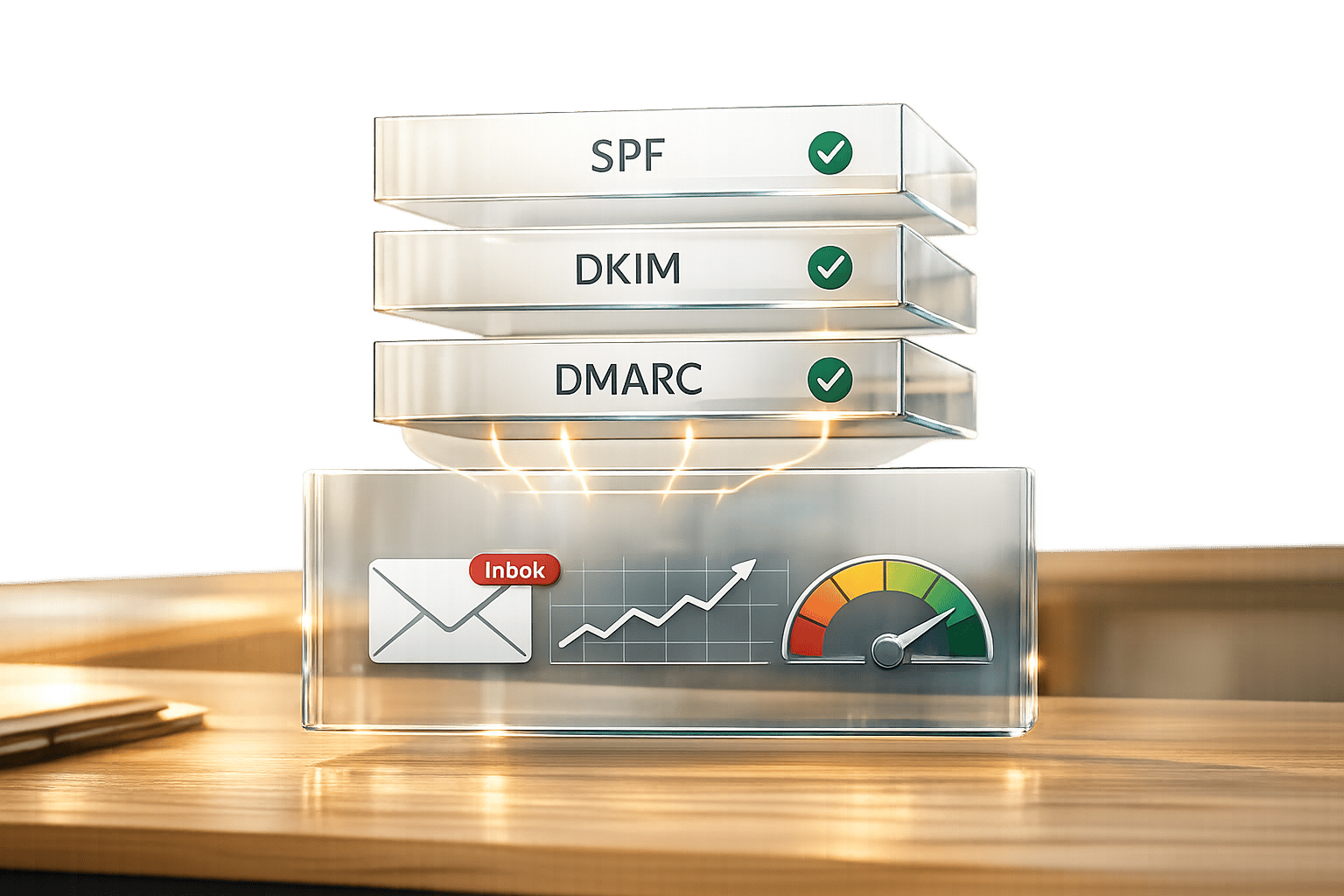
Setting up authentication involves three key protocols: SPF, DKIM, and DMARC, which should be configured in this order.
- SPF (Sender Policy Framework): Add a DNS TXT record to specify which IP addresses can send emails on behalf of your domain. Be cautious of the 10-lookup limit, and use SPF flattening to replace "include" mechanisms with direct IP addresses.
- DKIM (DomainKeys Identified Mail): This adds a cryptographic signature to outgoing emails, validated against a public key in your DNS records. Always use a 2048-bit key for stronger security, as 1024-bit keys are now outdated. Many API providers simplify this process by generating CNAME records for DKIM signing.
- DMARC (Domain-based Message Authentication, Reporting, and Conformance): This protocol defines how to handle authentication failures and improves your sender reputation. Start with a
p=nonepolicy for 2–4 weeks to monitor reports, then move top=quarantineand finallyp=rejectfor maximum deliverability. Note that Microsoft 365 now viewsp=noneas insufficient for reputation credit, so advancing top=quarantineorp=rejectis recommended.
Platforms like Icemail.ai streamline this entire process, automating the addition of SPF, DKIM, and DMARC records in just 10 minutes. After setup, verify everything using Gmail’s “Show original” feature - ensure all protocols show a "PASS" status.
With authentication in place, the final step is integrating and testing your API.
API Integration and Testing
Start by generating API keys from your provider’s dashboard, then use RESTful endpoints for tasks like mailbox creation, email sending, and bounce handling. Implement exponential backoff for HTTP 429 errors to handle rate limits effectively. Use tools like Mail-tester.com to validate your setup and aim for a score above 8/10.
Before scaling up, warm up your email accounts over 14–21 days. Begin with 5–10 emails daily and gradually increase to 30–50 emails as your reputation improves. Skipping this warm-up can lead to spam flags within 72 hours.
Keep a close eye on your spam complaint rate - Gmail and Yahoo require complaints to stay below 0.3%. Setting up webhooks for real-time alerts on mailbox failures or domain propagation issues can help maintain smooth operations. Teams with DMARC policies set to p=quarantine or p=reject often achieve about 12% higher inbox placement rates compared to those using p=none.
Best Practices for Maximizing API-Driven Email Deliverability
Boosting email deliverability relies on a mix of strategies. Building on earlier improvements like authentication and bounce management, here are three effective ways to take your efforts further.
Personalization and Segmentation via APIs
APIs can supercharge your email lists by adding layers of data, such as firmographic details (like industry, company size, or revenue), technographic insights (e.g., software usage), and growth indicators (such as funding rounds or hiring activity). This allows you to create hyper-targeted micro-segments of 50–200 prospects filtered by five or more criteria. For example, you could target "Series B SaaS companies using HubSpot." According to WarmySender, campaigns using micro-segmentation see reply rates of 8–12%, compared to just 3–4% for broader outreach.
"Audience segmentation is the most effective way to send targeted content and impact engagement and deliverability rates."
– Instantly.ai
APIs also make behavioral segmentation simpler by tracking engagement metrics. You can group contacts by activity level - such as Engaged, Warming, or Cold - and adjust your approach accordingly. For instance, re-engage inactive users or suppress contacts who haven’t opened an email in 120 days to protect your sender reputation. Keeping spam complaints under 0.3% is crucial, and regular list validation is key since B2B contact data decays at about 2.1% each month.
Real-Time Monitoring with Webhooks
Webhooks provide instant updates by pushing data to your server as events happen, eliminating the need for constant polling. This real-time feedback is invaluable for tracking events like email_bounced, email_delivered, or lead_unsubscribed. For example, you can automatically suppress any email address that triggers a hard bounce (SMTP 550 error), helping you maintain a bounce rate below the 2% threshold required by ISPs.
"Webhooks flip the script. Instead of asking 'anything new?' every 60 seconds, your server listens and reacts instantly when a prospect replies or an email bounces."
– Hans Dekker, Sales Expert
Webhooks can handle significantly more concurrent requests - up to 10 times more - compared to systems relying on synchronous API calls, as they avoid blocking threads while waiting for responses. To make the most of webhooks, configure them to return 200 OK immediately and process events asynchronously using a message queue like Redis or RabbitMQ. For added security, verify incoming webhook requests with HMAC-SHA256 signatures to ensure they come from your email service provider.
Once real-time monitoring is in place, make sure every email address is validated before sending.
Pre-Send Email Verification
Email verification APIs are essential for cleaning your contact lists before launching campaigns. A robust validation process should check for syntax errors (RFC compliance), verify DNS/MX records, perform SMTP handshakes, and flag high-risk addresses, such as disposable or role-based emails. The good news? Modern APIs can complete these checks in under three seconds per address.
For proactive list hygiene, integrate real-time verification at points of data collection, like sign-up forms, to catch typos or bots immediately. If you’re working with older lists or segments inactive for over 90 days, bulk verification is a must to counteract data decay. Studies of over 10 billion email addresses show that roughly 28% of databases are invalid or outdated. Use risk-based segmentation to classify addresses as "Low", "Medium", or "High" risk, and consider implementing double opt-in for medium-risk leads to weed out fake emails.
Platforms like Icemail.ai simplify this process with automated verification and built-in warmup features. With a setup time of just 10 minutes, Icemail.ai handles DNS configuration and list hygiene automatically, making it a fast, hassle-free solution for scaling cold email campaigns while maintaining strong sender reputations.
Comparing API Solutions: Why Icemail.ai Stands Out
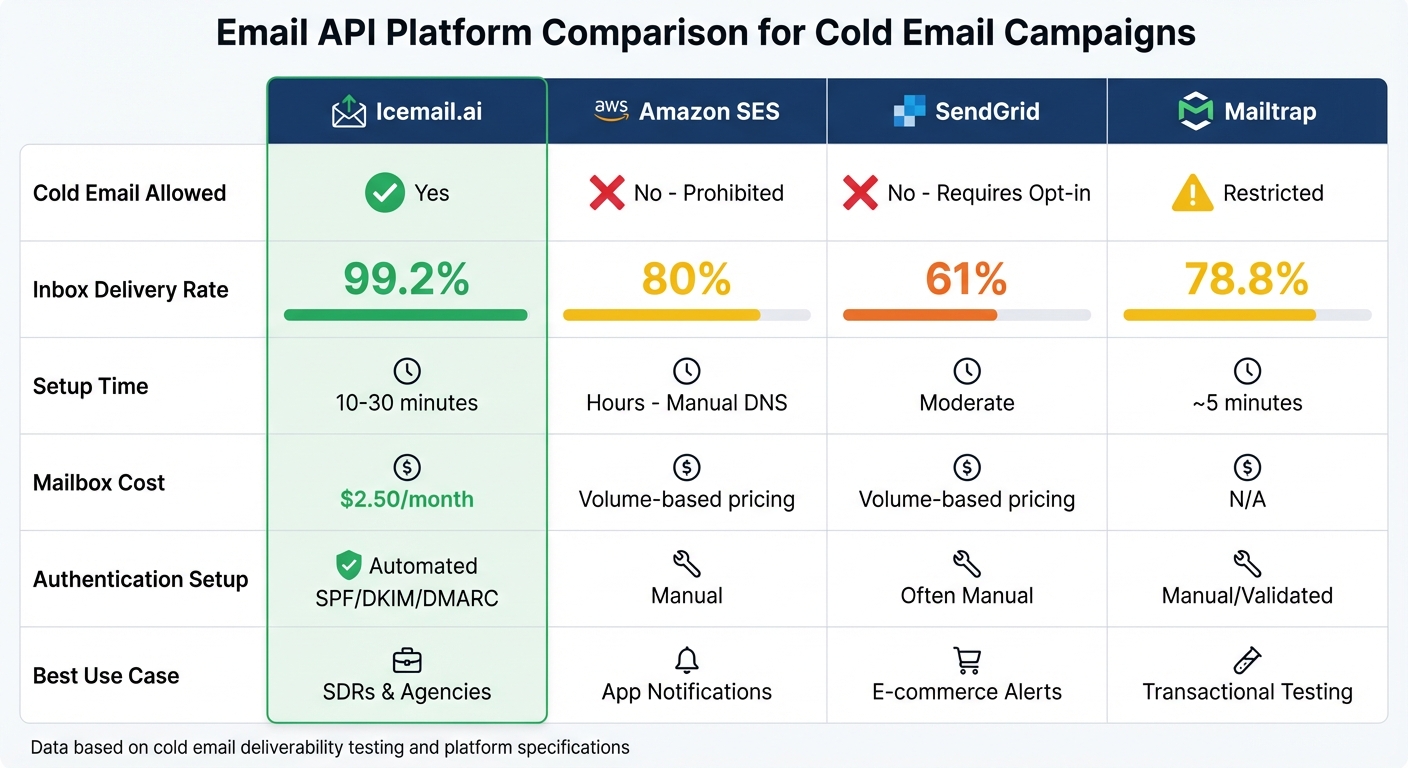
Email API Platform Comparison: Deliverability Rates and Features
When it comes to API-driven solutions for improving email deliverability, a direct comparison of key players shows why Icemail.ai takes the lead. Selecting the right infrastructure is essential for optimizing cold outreach, and Icemail.ai is specifically designed to address the unique challenges of this use case. Unlike transactional email services, it avoids account suspensions and eliminates the hassle of manual setups.
Feature Comparison Table
Here’s a side-by-side look at how Icemail.ai stacks up against competitors in areas critical to cold email success:
| Feature | Icemail.ai | Amazon SES | SendGrid | Mailtrap |
|---|---|---|---|---|
| Cold Email Allowed | Yes | No (Prohibited) | No (Requires Opt-in) | Restricted |
| Inbox Delivery Rate | 99.2% | 80% (20% spam) | 61% | 78.8% |
| Setup Time | 10–30 minutes | Hours (Manual DNS) | Moderate | ~5 minutes |
| Mailbox Cost | $2.50/month | N/A (Volume-based) | N/A (Volume-based) | N/A |
| Authentication Setup | Automated SPF/DKIM/DMARC | Manual | Often Manual | Manual/Validated |
| Pricing Model | Per Mailbox | $0.10 per 1,000 emails | Starts at $19.95/month | Starts at $15/month |
| Best For | SDRs & Agencies | App Notifications | E-commerce Alerts | Transactional Testing |
With a 99.2% inbox delivery rate, Icemail.ai outperforms competitors by a wide margin - 20 to 38 percentage points. Features like AI-driven domain discovery and bulk mailbox updates further set it apart, offering a level of automation and efficiency that traditional services can’t match.
Icemail.ai Pricing and Plans
Icemail.ai provides flexible pricing tiers to accommodate teams of all sizes and outreach needs:
- Free ($0/month): Includes basic task management, data encryption, and real-time sync - ideal for testing.
- Pro ($10/month): Adds custom workflows and deadline alerts, perfect for individual SDRs.
- Enterprise ($19/month): Features collaboration tools tailored for agencies managing multiple clients.
Mailboxes are priced at just $2.50 per month, which is significantly less than competitors charging $3.90–$5.00. Additionally, the platform’s 1-click mailbox export simplifies configuration transfers, while its AI-powered domain discovery makes securing domains for large-scale campaigns seamless. These features, combined with its focus on cold email deliverability, make Icemail.ai the go-to solution for teams aiming for scalable, high-performing outreach campaigns.
With these standout features and cost-effective pricing, it’s clear why Icemail.ai is the preferred choice for teams prioritizing high deliverability and efficiency.
Conclusion
API-driven systems are transforming how cold email deliverability is managed. By automating critical processes like SPF, DKIM, and DMARC configuration, these systems tackle common issues such as ISP throttling and domain blacklisting - problems often caused by manual setup errors. The results speak for themselves: emails sent via API boast an average open rate of 42.4%, compared to just 30.5% for those relying on traditional SMTP methods.
Scalability is another standout benefit. Features like account rotation and SISR (Server & IP Sharding & Rotation) spread the sending load across multiple warmed inboxes, safeguarding your sender reputation. Meanwhile, real-time monitoring through webhooks enables teams to quickly detect and resolve deliverability challenges, ensuring campaigns stay on track.
"You cannot out-warm bad data. No amount of AI personalization or subject line optimization can recover a domain that has been burned by high bounce rates." - EmailVerifierAPI
For teams aiming to maximize cold email deliverability, Icemail.ai - Cold Email Infrastructure (Buy Google and Microsoft Mailboxes at $2) offers a tailored solution. With fast onboarding - often completed in under 10 minutes - and features like automated domain setup, DNS management, and real-time tracking, Icemail.ai is purpose-built for cold email outreach. Unlike traditional services like Amazon SES or SendGrid, it sidesteps the policy restrictions that can hinder cold email campaigns. For those who prioritize inbox placement and campaign success, Icemail.ai delivers the tools you need.
FAQs
Do I need an email API if I already use SMTP?
If you're using SMTP, deciding whether to switch to an email API depends on your needs and the scale of your email operations. SMTP handles small email volumes efficiently, but APIs bring several advantages, including quicker delivery, advanced tracking, and features like bounce management and real-time analytics. For businesses dealing with high-volume or application-triggered emails, APIs are often the smarter choice. Services like Icemail.ai offer premium solutions with quick setup and excellent inbox placement, making them a strong option for optimizing your email system.
What deliverability metrics should I monitor first?
To keep your email campaigns on track, start by keeping an eye on bounce rates and sender reputation metrics like SMTP handshake integrity. If your bounce rates go over 2%, it can negatively impact deliverability. This might trigger ISP throttling or even push your emails into spam folders. By regularly monitoring these metrics, you can help ensure your emails land in inboxes and maintain strong email performance.
How many mailboxes and domains should I use to scale safely?
To scale your email outreach effectively and securely, limit yourself to using no more than 3 mailboxes per domain. If you need more capacity, consider adding 2–3 additional domains as required. This approach helps safeguard your sender reputation and ensures your emails consistently reach inboxes.
For a streamlined solution, platforms like Icemail.ai stand out. They offer quick inbox setup and deliverability optimization, making them a smart choice for scaling email campaigns with ease and reliability.